
What Is Computer Networking, and What Problems Does It Solve?
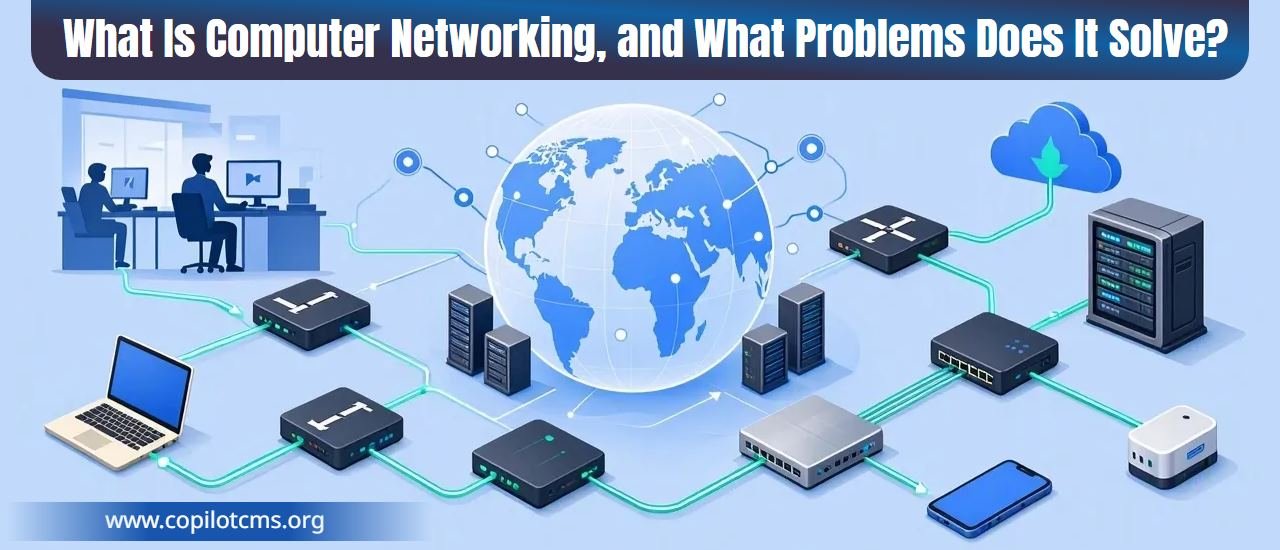
Have you ever wondered how your phone sends a photo to a friend, how several computers can use the same printer, or how a website delivers information to millions of people around the world? Behind these everyday activities is computer networking: the technology that allows computers and other devices to communicate, share resources, and work together.
What Is Computer Networking?
Computer networking is the practice of connecting two or more computing devices so they can exchange information and share resources. These devices might include desktop computers, laptops, smartphones, printers, servers, smart televisions, security cameras, and many other electronic gadgets.
The connections between these devices can be physical, using cables, or wireless, using radio signals. Once connected through suitable networking equipment and software, devices can send and receive data according to agreed rules called protocols.
For example, when you send a document from your laptop to a network printer, the laptop sends the document's data across the network. The printer receives that data and uses it to produce the printed pages. You do not need to carry a USB drive from one machine to another because the network handles the communication.
Computer networking makes this kind of communication possible on a small scale, such as inside a home, and on a global scale, such as across the internet.
Why Do Computers Need Networks?
A computer can perform many tasks on its own. It can calculate numbers, store files, run programs, and display information. However, a standalone computer has limited access to information and resources outside itself unless those resources are transferred to it or made available through some form of connection.
Imagine that every employee in an office had a separate printer, a separate collection of documents, and no way to communicate digitally with colleagues. Sharing information would require copying files onto storage devices, carrying papers between desks, or manually entering the same information several times.
A network removes many of these barriers. Connected devices can exchange information, use shared equipment, access central files, and communicate with other systems without requiring a separate physical transfer for every task.
Computer networking solves several important problems:
- Communication: It allows devices to exchange messages, files, and other information.
- Resource sharing: Multiple users can access shared printers, storage systems, and internet connections.
- Centralized information: Organizations can keep important files and records in shared locations.
- Remote access: Users can access permitted resources even when they are far away from the devices hosting them.
- Collaboration: People can work on shared documents, participate in video meetings, and coordinate their activities.
- Scalability: Networks can grow as an organization adds more devices, users, and services.
A Real-World Analogy: Roads Connect People and Places
One useful way to understand computer networking is to compare it to a system of roads.
Imagine that every computer is a building. One building contains a school, another contains a hospital, and a third contains a warehouse. Each building has useful things inside, but people need a way to travel between them if they want to exchange goods, information, or services.
Roads connect the buildings. Intersections help direct traffic, traffic signs establish rules, and delivery vehicles carry packages from one destination to another.
A computer network works in a similar way:
- Devices are the buildings: Each device can store, create, or use information.
- Network connections are the roads: Cables and wireless signals provide paths for data to travel.
- Switches and routers help direct traffic: They help data reach the appropriate destination.
- Network protocols are the traffic rules: They establish how devices communicate and how information is formatted, addressed, transmitted, and received.
- Data packets are the delivery packages: Information can be divided into smaller units and sent across the network.
There is one important difference: data does not travel as physical packages. It is represented by electrical signals, radio waves, or optical signals carrying digital information.
Just as a road system allows a town to function as a connected community rather than a collection of isolated buildings, a computer network allows devices to function as parts of a larger system.
How Does a Computer Network Work?
At its simplest, networking involves a sender, a destination, a connection, and rules for communication. When one device wants to send information to another, several processes work together to deliver it.
1. A Device Creates Data
Suppose you send a photograph to a friend. Your phone begins with the photograph stored as digital data. Before the image can reach your friend's device, the networking software prepares the relevant information for transmission.
2. The Data Is Prepared for Transmission
Many forms of network communication divide data into smaller units called packets. A packet carries some of the data being transmitted along with information needed to help deliver it.
Think of sending a large book through the postal system by dividing it into numbered envelopes. Each envelope contains part of the book and information that helps the recipient put the material in the correct order. Packet-based communication follows a broadly similar idea, although real network protocols have more specific rules and capabilities.
3. The Network Moves the Data
The data travels through the available network connections. Depending on the situation, it might pass through a Wi-Fi access point, a network switch, a router, an internet service provider's equipment, and other networks.
The exact route depends on the network's design and the destination. Two devices in the same home may communicate locally without sending their data across the wider internet. Communication with a distant online service usually involves additional networks.
4. The Destination Receives the Data
The receiving device processes the incoming information according to the relevant protocols. Depending on the communication method, it may check whether data arrived correctly, request missing information, or put received packets into the correct order.
Once the information has been processed, the destination application can display the photograph, open the document, play the video, or perform another requested task.
5. The Devices Follow Shared Rules
Devices need common rules to communicate successfully. These rules are called network protocols.
Imagine two people trying to have a conversation when neither understands the other's language. Even if they can hear each other perfectly, communication will be difficult. Protocols play a comparable role by helping devices agree on how information should be exchanged.
Different protocols perform different jobs. Some help deliver data between devices and networks, while others support web browsing, email, file transfers, and other applications.
What Are the Main Parts of a Computer Network?
A computer network is not a single piece of equipment. It is a combination of devices, connections, and software working together.
Computers and Other End Devices
End devices are the devices at which network communication begins or ends. Examples include laptops, smartphones, desktop computers, printers, servers, and smart televisions.
A device might request information, provide a service, or do both. Your laptop might request a webpage from a web server, while a network printer receives documents sent by several computers.
Network Interface Cards and Adapters
A network interface allows a device to connect to a network. Many computers have built-in Ethernet and Wi-Fi capabilities, while others use external adapters.
You can think of a network interface as a device's connection point to the network. Without a suitable interface, a computer cannot directly use that particular network connection.
Switches
A network switch connects devices within a local network, such as computers, printers, and servers in an office. It forwards data toward the appropriate connected device based on information it learns about the network.
Imagine an office mailroom that receives packages and directs each one toward the correct department. A switch performs a comparable job for network traffic within a local network, although it uses technical addressing information rather than reading human-readable package labels.
Routers
A router connects different networks and forwards data between them. In a typical home, the router helps connect the home network to the internet.
If your laptop requests information from an online website, the router helps direct the traffic toward the next network on its journey. When responses return, the router helps deliver them to the appropriate device on the home network.
Many home devices combine a router, a network switch, a Wi-Fi access point, and other functions in a single box. This is why people often refer to their entire home networking device simply as a router.
Modems and Internet Connections
A modem is a device that adapts signals for communication over a particular type of access connection. The exact technology depends on the service, such as cable, DSL, or a cellular connection. Fiber internet uses optical networking equipment, which may include an optical network terminal rather than a traditional modem.
The modem or other access equipment helps connect your home or office to your internet service provider's network. The router then provides routing and, commonly, local network connectivity for your devices. Sometimes these functions are combined in one device.
Servers
A server is a computer or software system that provides a service to other devices, often called clients. A server might deliver webpages, store shared files, manage email, or run an application.
For example, when you visit a website, your browser acts as a client and requests information from a web server. The server processes the request and sends back the information needed to display the page.
Transmission Media
Data needs a way to travel between devices. Common transmission media include Ethernet cables, fiber-optic cables, and wireless radio signals.
Copper cables transmit electrical signals, fiber-optic cables transmit light, and Wi-Fi uses radio waves. Each has different characteristics relating to speed, distance, interference, cost, and installation.
What Is the Difference Between a Network and the Internet?
The terms computer network and internet are closely related, but they do not mean the same thing.
A computer network is a group of connected devices that communicate and share resources. It can be as small as two computers connected together or as large as the network infrastructure of a multinational organization.
The internet is a vast global system of interconnected networks that communicate using a common family of networking protocols. It enables devices and services around the world to exchange information.
Consider a home network. Your laptop, phone, television, and printer may all connect to the same router. They form a local network even if the internet connection is temporarily unavailable.
When that home network connects through an internet service provider, it can communicate with online services around the world. The local network is one part of the much larger internet infrastructure.
The distinction matters because not every network is connected to the internet, and not every kind of network communication requires internet access.
Different Types of Computer Networks
Networks can be classified according to their size, purpose, geographical coverage, and the technologies they use. Some common categories describe how far a network reaches.
Personal Area Network (PAN)
A personal area network connects devices around an individual, often over a short distance. For example, your phone might connect to wireless headphones or a smartwatch through Bluetooth.
These connections make it possible for small personal devices to exchange information without requiring a large network infrastructure.
Local Area Network (LAN)
A local area network connects devices within a limited area, such as a home, school, office, or laboratory. Ethernet and Wi-Fi are common technologies used in local networks.
For example, a small business might connect its computers, printer, file server, and internet router through a LAN. Employees can then share resources and communicate with systems inside the office.
Wireless Local Area Network (WLAN)
A wireless local area network is a LAN that connects devices wirelessly, commonly using Wi-Fi. Instead of requiring an Ethernet cable for every device, a Wi-Fi access point allows compatible devices to communicate over radio signals.
A WLAN is particularly useful when people need to move around with laptops, tablets, or phones while remaining connected.
Wide Area Network (WAN)
A wide area network connects devices or smaller networks across large geographical distances. A company might use a WAN to connect offices in different cities or countries.
WAN connections may rely on service-provider infrastructure, fiber-optic links, leased connections, or other technologies. The internet is the best-known example of a global system built from interconnected networks, though a private WAN is not necessarily part of the public internet.
Enterprise and Data Center Networks
Large organizations often operate complex networks that connect employees, business applications, storage systems, security equipment, and data centers. These networks may support thousands of devices and need to remain available even when individual components fail.
Data center networks are designed to connect large numbers of servers and storage systems efficiently. They support services such as cloud computing, online banking, streaming platforms, and business applications.
What Problems Does Computer Networking Solve in Everyday Life?
Networking is valuable because it removes practical barriers that would otherwise make digital activities slower, more expensive, or more difficult.
1. Sharing Files Without Physical Transfers
Without networking, sharing a file might require copying it to a USB drive, physically handing that drive to another person, and copying the file onto another computer.
With a network, users can transfer files directly or place them in shared storage that authorized people can access. This is useful for sharing photographs with family, exchanging documents with colleagues, or distributing assignments in a classroom.
Cloud storage extends this idea by allowing users to access files through online services, often from different devices and locations.
2. Sharing Expensive Equipment
Imagine an office with twenty employees. Buying a separate printer for every employee would be costly and would take up unnecessary space.
A network allows several authorized computers to send documents to one shared printer. The organization can reduce equipment costs, simplify maintenance, and make better use of its resources.
The same principle applies to shared storage, internet connections, specialized computing equipment, and other network-accessible resources.
3. Enabling Communication Across Distances
Networking allows people to communicate even when they are in different buildings, cities, or countries. Email, messaging applications, voice calls, and video meetings all depend on network communication.
For example, a teacher can hold a live online class for students who are not physically present in the classroom. A business can coordinate a project across multiple countries without requiring everyone to travel to the same location.
4. Making Online Information Available
Websites, digital libraries, news services, educational platforms, and online databases provide information to users through networks.
When you search for a topic online, your device communicates with remote systems that help locate and deliver relevant information. Networking makes it possible for the information stored on distant computers to become available on your own screen.
5. Supporting Online Shopping and Banking
Online shopping requires communication between your device, a retailer's systems, payment services, and often delivery or inventory systems. Online banking similarly relies on networks to exchange requests and account information between users and financial institutions.
These systems can save time and make services available outside traditional office hours. They also require strong security measures because the information being exchanged may be sensitive.
6. Enabling Remote Work and Learning
Many people can work or study from home because networks connect their devices to online meeting platforms, learning systems, shared documents, and workplace applications.
Depending on the organization's setup, employees may also use a virtual private network (VPN) or another secure remote-access solution to reach internal resources. Networking makes remote access possible, while security controls help determine who is allowed to access what.
7. Connecting Smart Devices
Smart devices use networks to exchange information with phones, home systems, and online services. Examples include smart thermostats, connected cameras, voice assistants, and some household appliances.
A smart thermostat, for instance, may let you check the temperature in your home while you are away. Networking carries information between the thermostat, the relevant application, and any remote service involved.
8. Making Large-Scale Services Possible
Modern digital services often depend on many computers working together. A streaming platform may use servers for storing video, processing requests, managing accounts, and delivering content through distributed infrastructure.
Networks allow these systems to exchange information and serve large numbers of users. Without networking, many services that appear to operate as a single application would be difficult or impossible to provide at a global scale.
How Do Devices Find Each Other on a Network?
For data to reach the correct destination, devices and networking equipment need ways to identify endpoints and decide where information should go. Several concepts work together to make this possible.
IP Addresses: Network Locations
An Internet Protocol (IP) address identifies a network interface for communication using IP. Depending on the network, devices may receive addresses automatically or be configured with them manually.
Think of an IP address as a delivery address used by the network. It helps routers forward data toward the appropriate destination. IP addresses can change, and one device may have different addresses on different networks.
There are two major versions in widespread use: IPv4 and IPv6. They use different address formats, and IPv6 provides a much larger address space.
MAC Addresses: Local Network Identification
A Media Access Control (MAC) address is an identifier associated with a network interface and used by many local network technologies, including Ethernet and Wi-Fi.
On a typical local network, switches use MAC address information to help forward frames to the correct interfaces. Routers, by contrast, use IP addresses to make decisions about forwarding packets between networks.
Although a MAC address is often built into a network interface, it may be changed or randomized by software. It should not be treated as a guaranteed permanent identifier for a person or device.
DNS: Turning Names into Addresses
People find it easier to remember names such as example.com than numerical IP addresses. The Domain Name System (DNS) helps translate domain names into information, commonly including IP addresses, that devices can use to locate online services.
DNS is similar to a contact list on your phone. Instead of remembering a friend's telephone number, you select their name and let the contact system help you reach the right person.
When you enter a website's domain name, your device may use a DNS resolver to find the relevant address information. The browser can then attempt to connect to the destination service.
Ports: Directing Traffic to the Right Service
A single computer can run many network services at the same time. For example, it might host a website, accept secure remote connections, and exchange email.
Network ports help the operating system direct communication to the appropriate application or service. An IP address helps identify the destination interface, while a port number helps identify the relevant communication endpoint within the device.
Imagine a large office building with one street address but many departments. The street address gets you to the building, while the department number helps you reach the right destination inside it.
What Are Network Protocols?
A network protocol is a set of rules that governs some aspect of communication between devices. Protocols define how information is structured, transmitted, interpreted, and handled.
Different protocols solve different problems. Rather than relying on one enormous set of rules, networks use layers of protocols that work together.
- IP: Provides addressing and packet forwarding across interconnected networks.
- TCP: Provides a reliable, ordered stream of data between applications, using mechanisms for detecting loss and retransmitting information when needed.
- UDP: Sends data in individual messages without providing TCP-style guarantees of delivery or ordering. It is useful for applications that prefer low overhead or implement their own delivery mechanisms.
- HTTP and HTTPS: Support communication between web clients and servers. HTTPS protects HTTP communication using encryption and authentication through TLS.
- DNS: Helps applications find information associated with domain names.
- DHCP: Commonly allows devices to obtain network configuration automatically, including an IP address and other settings.
These protocols do not all perform the same job. Some deal with addressing and routing, others manage how data is transported, and others support particular applications.
What Happens When You Open a Website?
Opening a website is a good example of several networking concepts working together. A simple visit may involve the following steps.
- You enter a domain name. You type a website address into your browser and request a page.
- The browser finds the destination. If necessary, your device uses DNS to obtain the relevant IP address.
- Your device establishes communication. It connects to the server using the appropriate network protocols. For an HTTPS website, the connection also involves establishing a secure TLS session.
- Network equipment forwards the traffic. Routers and other systems help move the data toward the destination. The traffic may pass through several different networks.
- The web server processes the request. The server returns the requested page or the information needed to generate it.
- Your browser displays the result. It processes the response and may request additional resources, such as images, fonts, scripts, or stylesheets.
Much of this happens in fractions of a second. A website may nevertheless load slowly if the network is congested, the server responds slowly, the connection has high latency, or the page requires many large resources.
Network Speed, Bandwidth, and Latency
People often describe a network as fast or slow, but several different factors influence how well it performs.
Bandwidth: How Much Data Can Move
Bandwidth describes the capacity of a connection to transfer data over time. It is commonly measured in bits per second, such as megabits per second (Mbps) or gigabits per second (Gbps).
Imagine a highway. A wider highway can carry more vehicles at the same time. Similarly, a connection with greater bandwidth can generally transfer more data per second when other conditions allow it.
Higher bandwidth is particularly useful when downloading large files, streaming high-resolution video, or supporting many users at once.
Latency: How Long Communication Takes
Latency is the time it takes for data to travel between points in a network. It is often measured in milliseconds. A common measurement is round-trip time: how long a message takes to reach a destination and for a response to return.
Think of bandwidth as the width of a road and latency as the time needed to reach the destination. A connection can have high bandwidth but still feel unresponsive if latency is high.
Low latency is especially important for online gaming, interactive video calls, remote control systems, and other activities that depend on quick responses.
Packet Loss and Congestion
Sometimes packets fail to reach their destination. This is called packet loss. It can result from network congestion, wireless interference, faulty equipment, or other problems.
Some protocols recover from missing data by retransmitting it. This improves reliability but can increase delays. Other applications may tolerate occasional losses but show visible glitches, such as a frozen video call or distorted audio.
Congestion occurs when more traffic competes for network resources than those resources can comfortably handle. It can increase delays and reduce the amount of data successfully delivered.
What Is the Difference Between Wired and Wireless Networking?
Devices can communicate through physical cables or wireless signals. Both approaches are useful, and the best choice depends on the task, environment, cost, and performance requirements.
Wired Networking
Wired networks commonly use Ethernet cables, while longer-distance links may use fiber-optic cables. A physical connection can offer stable performance, predictable latency, and reduced exposure to radio interference.
Wired connections are often preferred for desktop computers, servers, gaming systems, and equipment that needs reliable, consistent connectivity. However, installing cables can be inconvenient or expensive, particularly across large buildings.
Wireless Networking
Wi-Fi allows devices to communicate through radio signals without a separate network cable for every connection. It makes it easier to connect phones, tablets, laptops, and smart devices throughout a home or office.
Wireless networking offers flexibility, but performance can be affected by distance, walls, interference, the number of connected devices, and the capabilities of the access point.
Wireless does not automatically mean slow, and wired does not automatically mean fast. The actual performance depends on the equipment, connection, network conditions, and the service being used.
How Do Networks Stay Secure?
Connecting devices creates opportunities for sharing, but it also creates risks. If a network is poorly protected, unauthorized people may be able to access devices, intercept inadequately protected communications, or misuse shared resources.
Network security involves protecting devices, data, connections, and services against unauthorized access and disruption.
Authentication and Access Control
Authentication checks whether a user or device is who or what it claims to be. Access control determines which resources that user or device is allowed to use.
For example, a home Wi-Fi password helps restrict access to the wireless network, while a password or other authentication method on a shared file service can restrict access to particular documents.
Organizations often use additional controls, such as multifactor authentication, to make unauthorized access more difficult.
Encryption
Encryption transforms readable information into a form that cannot readily be understood without the appropriate key. It helps protect data from being read by unauthorized parties.
HTTPS uses TLS to protect communication between a browser and a website. Properly configured Wi-Fi security also helps protect wireless communications. Encryption does not eliminate every security risk, but it is an important part of protecting data.
Firewalls
A firewall applies rules to network traffic, allowing or blocking communications according to its configuration. It can help restrict unwanted connections and reduce exposure to attacks.
Home routers often include basic firewall capabilities, while organizations may use more advanced firewalls to control traffic between different networks and services.
Updates and Monitoring
Network devices and the computers connected to them need appropriate software updates. Updates may fix security weaknesses, correct errors, and improve stability.
Monitoring can also help identify unusual activity, failing equipment, unexpected traffic, or other problems. Good security combines several protective measures rather than relying on one password or device.
Common Networking Problems and How to Troubleshoot Them
Networking makes digital life easier, but connections do not always work as expected. Understanding a few basic troubleshooting steps can help you identify the cause of common problems.
Problem 1: The Device Cannot Connect to Wi-Fi
If a laptop or phone cannot join a wireless network, check whether Wi-Fi is enabled and whether the correct network has been selected. Confirm that the password is correct and that the device is within range.
If the problem continues, try disconnecting and reconnecting, restarting the device, or checking whether other devices can join the same network. If every device has trouble connecting, the issue may be with the access point or router rather than an individual device.
Problem 2: Wi-Fi Connects, but the Internet Does Not Work
A device can connect successfully to a home router even when the router cannot reach the internet. The local wireless connection and the internet connection are separate links.
Try opening more than one website. If none works, check the router's internet or WAN connection and look for service interruptions from your internet provider. Restarting the router may help with some temporary problems, but it will not fix an external service outage or a damaged cable.
Problem 3: The Internet Is Slow
First, determine whether the problem affects one device or all devices. If only one device is slow, the cause may involve that device, its wireless signal, or a particular application. If several devices are affected, the router, internet connection, or wider service may be responsible.
You can try moving closer to the Wi-Fi access point, temporarily disconnecting unnecessary devices, pausing large downloads, and testing the connection at different times.
A speed test can help measure download speed, upload speed, and sometimes latency. Remember that a speed test measures performance under particular conditions; it does not automatically identify the cause of a problem.
Problem 4: One Website Will Not Open
If other websites work normally, the problem may be specific to the website, its server, your browser, or the DNS information being used.
Try another browser or device, check the website's address, and see whether the service is experiencing an outage. Clearing cached information or refreshing DNS-related settings may help in some cases, but these steps are not necessary for every website problem.
Problem 5: A Network Printer Is Not Working
Check that the printer is powered on and connected to the correct network. Confirm that the computer is connected to a network that can reach the printer and that the correct printer has been selected.
Also check for paper jams, empty supplies, error messages, or jobs stuck in the print queue. If other computers can print successfully, the problem may be limited to one computer or its printer configuration.
Problem 6: A Video Call Keeps Freezing
Video calls require more than a high advertised internet speed. They also benefit from low latency, limited packet loss, and a stable connection.
Try using a wired connection where practical, moving closer to the Wi-Fi access point, stopping large downloads, or turning off unnecessary high-bandwidth applications. If the problem occurs only with one meeting service, its servers or the application's settings may also be involved.
What Are the Limitations of Computer Networking?
Networking solves many problems, but it introduces challenges that users and organizations must manage.
Dependence on Connectivity
Online services often depend on a working connection. If the internet service fails, a cloud application may become unavailable even when your computer is functioning properly. Local applications and resources may continue to work if they do not depend on the failed connection.
Security and Privacy Risks
Connected devices can become targets for cyberattacks. Weak passwords, outdated software, insecure configurations, and excessive access permissions can expose information or allow unauthorized activity.
Protecting a network requires ongoing attention to security, not merely installing a router and assuming that everything is safe.
Cost and Complexity
Large networks may require expensive equipment, specialist staff, monitoring tools, maintenance, and careful planning. As the number of devices and services increases, managing performance and security becomes more complicated.
Performance Is Not Unlimited
Every network has practical limits. Connections have finite bandwidth, equipment has limited capacity, and long-distance communication takes time. Poor design or heavy traffic can lead to delays, interruptions, and reduced performance.
Network engineers address these challenges by choosing suitable equipment, planning capacity, monitoring traffic, improving reliability, and applying appropriate security measures.
Why Computer Networking Matters in the Modern World
Computer networking is a foundation of modern digital life. It supports the systems people use for education, healthcare, communication, banking, entertainment, scientific research, manufacturing, and public services.
Hospitals use networks to exchange information between authorized systems and departments. Universities connect students to online learning platforms and research resources. Businesses coordinate operations across different locations. Scientists share data and use computing resources that may be distributed across multiple institutions.
Even technologies that appear to work independently often rely on networks behind the scenes. Cloud storage, artificial intelligence services, online gaming, navigation applications, and smart-home devices all use network communication in different ways.
Understanding networking also helps ordinary users make better decisions. It becomes easier to understand why a website may be unavailable, why a wireless signal becomes weaker through walls, why a device can connect to Wi-Fi without accessing the internet, and why protecting a home network matters.
The Takeaway
Computer networking connects devices so they can exchange information, share resources, and work together. It relies on network interfaces, cables or wireless signals, switches, routers, servers, addresses, and communication protocols to move data from one place to another.
From sharing a printer at home to operating global websites and online banking systems, networking solves the problem of isolated devices that cannot easily communicate or share what they know and provide.
The central idea is simple: a computer becomes far more useful when it can communicate with other computers. Networking turns individual devices into connected systems, making modern communication, collaboration, and digital services possible.