
How Does Your Phone Know Which Way You’re Holding It?
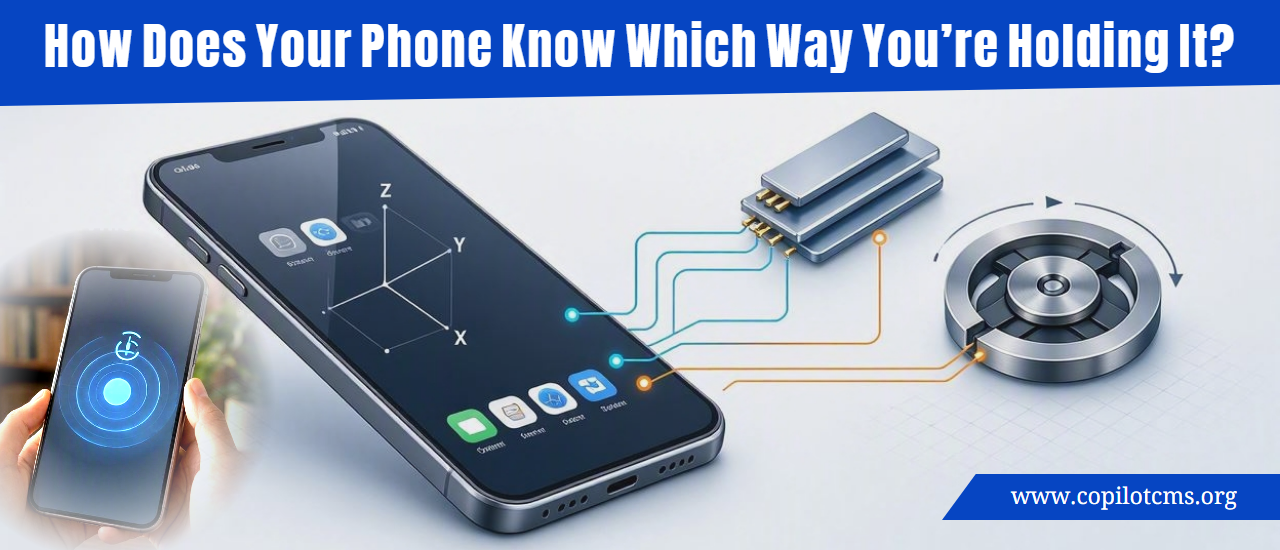
Turn your phone sideways and the screen often rotates almost instantly. But how does a flat piece of glass know whether you are holding it upright, sideways, or even moving it around?
The answer involves tiny motion sensors inside your phone—especially the accelerometer and gyroscope. Working together, they give the phone a surprisingly good sense of how it is positioned and how it is moving.
Your Phone Has a Sense of Motion
Your phone cannot literally “see” which direction you are holding it. There is no tiny person inside looking at the screen and deciding whether it should rotate.
Instead, the phone measures physical forces and movement using sensors that are small enough to fit inside a modern smartphone.
The two most important sensors for understanding orientation are:
- Accelerometer: Measures acceleration, including the constant pull of gravity.
- Gyroscope: Measures how the phone is rotating or turning.
Some phones also combine information from other sensors, such as the magnetometer, which acts like a digital compass.
The Accelerometer: Your Phone’s Tiny Motion Detector
The accelerometer is one of the most important pieces of the puzzle. It detects changes in motion along three directions: left and right, forward and backward, and up and down.
These three directions are commonly called the phone's X, Y, and Z axes.
But Here’s the Clever Part: Gravity
An accelerometer does more than detect whether your phone is speeding up or slowing down. It can also detect the effect of gravity.
Gravity is always pulling your phone toward the ground. The phone's accelerometer can detect this pull and determine which direction appears to be “down.”
That gives the phone an important clue about its orientation.
If you hold your phone normally in portrait mode, gravity is pulling toward the bottom edge of the phone. Turn the phone sideways, and gravity is now pulling toward what used to be the phone's side.
The phone can notice this change and tell the operating system, essentially, “The direction of gravity has changed, so the user probably rotated the phone.”
Real-World Version: Imagine a Box With a Marble
Imagine putting a small marble inside a box that can sense which side the marble is pressing against.
Hold the box upright and gravity makes the marble settle toward the bottom. Turn the box sideways and the marble moves toward the new bottom.
If the box can detect where the marble is being pulled, it can figure out how you are holding the box without actually seeing the outside world.
Your phone's accelerometer works on a much more sophisticated version of this basic idea. Instead of a visible marble, it contains microscopic structures that respond to movement and acceleration.
What Is Actually Inside an Accelerometer?
You might imagine a traditional mechanical device with a little weight bouncing around inside it. Modern smartphone accelerometers are much smaller and more complicated.
Many use a technology called MEMS, short for Micro-Electro-Mechanical Systems.
These devices contain extremely tiny mechanical structures built using techniques similar to those used to manufacture computer chips.
Inside can be microscopic moving structures suspended by tiny flexible components. When the phone accelerates, these structures move slightly relative to the rest of the sensor.
Electronic circuits detect these tiny changes and convert them into measurements that the phone's processor can understand.
So when you tilt or move your phone, something physical is actually happening inside the sensor—even though it is happening on a microscopic scale.
Why Three Directions Matter
A phone does not move only up and down. It can move in practically any direction.
That is why the accelerometer measures movement along three axes.
- X-axis: One side-to-side direction.
- Y-axis: The direction perpendicular to that.
- Z-axis: The direction going through the thickness of the phone.
By combining measurements from all three axes, the phone can build a picture of how it is positioned in three-dimensional space.
The Gyroscope: Detecting Rotation
The accelerometer is useful for figuring out the direction of gravity, but it is not perfect at detecting every kind of movement.
That's where the gyroscope comes in.
A gyroscope measures rotation. In other words, it helps the phone determine how quickly and in which direction it is turning.
Imagine holding a phone flat in your hand and slowly twisting your wrist. The gyroscope can detect that rotational movement.
Real-World Analogy: A Spinning Wheel
Imagine a spinning bicycle wheel. If you try to change the direction of the spinning wheel, you can feel that the wheel resists the change in a particular way.
Traditional gyroscopes used this kind of physical behavior. Smartphone gyroscopes, however, usually use microscopic vibrating structures rather than a large spinning wheel.
Those tiny structures change their behavior when the phone rotates, allowing electronics to measure the rotation.
Why Does the Phone Need Both Sensors?
You might wonder why one sensor isn't enough.
The simple answer is that the two sensors are good at different things.
The accelerometer is particularly useful for determining the direction of gravity and detecting linear acceleration. The gyroscope is particularly good at detecting rotation.
Combining them gives the phone a much better understanding of what is happening.
It's similar to navigating a car using two different instruments. One instrument might tell you which direction you are facing, while another tells you how quickly you are turning. Together, they provide a more complete picture.
How Screen Rotation Actually Happens
When you rotate your phone, the sensors don't directly rotate the screen. They simply produce measurements.
The operating system interprets those measurements and decides what they mean.
A simplified version of the process looks like this:
- You rotate the phone.
- The accelerometer detects a change in the direction of gravity relative to the phone.
- The gyroscope detects the rotational movement.
- The phone's software processes the sensor information.
- The operating system determines that the phone has moved from portrait to landscape orientation, or vice versa.
- The operating system tells the application to change its layout.
- The screen redraws the interface in the new orientation.
All of this can happen so quickly that it feels instantaneous.
Why Doesn't the Screen Rotate Every Time You Move?
If the phone simply reacted to every tiny change in sensor readings, the screen would constantly rotate whenever you moved your hand.
Instead, the software uses rules to decide when a change is significant enough to count as a genuine orientation change.
For example, if you slightly tilt your phone while reading, the phone generally does not immediately switch to landscape mode. It looks for a sufficiently large and stable change.
This prevents the interface from becoming annoying and constantly switching back and forth.
What Happens When You Turn Off Auto-Rotate?
Turning off automatic screen rotation does not necessarily mean your phone has stopped measuring its orientation.
The sensors can continue operating because other features and applications may still need their information.
Instead, disabling auto-rotate generally tells the operating system not to automatically change the screen orientation based on those measurements.
Think of it like having a thermometer in your house but choosing not to let the heating system automatically respond to its readings. The sensor can still measure something even when a particular automatic action is disabled.
Your Phone Can Detect Much More Than Screen Orientation
The same sensors that help rotate your screen can be used for many other things.
Games
Some mobile games let you steer a car by tilting the phone. The game reads the phone's motion sensors and translates your physical movement into an action inside the game.
Step and Activity Tracking
Motion sensors can help detect patterns associated with walking, running, and other movements. Software can analyze these patterns to estimate activity.
Camera Stabilization
Motion information can also help cameras compensate for small movements of your hands. Depending on the phone and camera system, sensors and software can help keep images and video steadier.
Virtual and Augmented Reality
Applications that place digital objects into the real world need to understand how the phone is moving and rotating.
The sensors provide important information that helps software maintain a sense of the phone's position and orientation as you move it around.
Fitness and Health Features
Motion sensors can contribute to features that recognize physical activity or movement patterns. The exact capabilities vary between phones and applications.
What About the Compass?
You may have heard that your phone also has a magnetometer.
This sensor is different from the accelerometer and gyroscope. A magnetometer detects magnetic fields and can be used to determine direction relative to Earth's magnetic field.
In simple terms, it helps your phone behave like a digital compass.
For example, a navigation application can combine information from multiple sensors to understand not only how the phone is tilted and rotated, but also which general compass direction it is facing.
This is one reason your phone can do much more than simply decide whether the screen should be portrait or landscape.
The Phone Doesn't Really “Know” Where It Is
There is an important distinction here.
Your phone's sensors are not thinking about orientation the way a person does. They are producing measurements. Software then uses mathematics and rules to interpret those measurements.
It's similar to a car's dashboard. The speedometer does not “understand” that you're driving quickly. It measures something and displays a number that software or mechanical systems can interpret.
Your phone works in a much more sophisticated way, but the basic idea is similar: sensors measure physical reality, and software turns those measurements into useful information.
Why Does the Phone Sometimes Get Orientation Wrong?
Like any measuring system, motion sensors are not perfect.
Several things can cause unusual behavior.
Sensor Calibration
Sensors can sometimes become less accurate or require calibration. Some phones and applications provide ways to recalibrate motion or compass sensors.
Magnetic Interference
Objects containing strong magnets can interfere with the magnetometer. This can make compass-related features behave strangely.
Software Problems
A temporary software problem can prevent an application or the operating system from interpreting sensor information correctly.
Physical Damage
If a phone has suffered a significant drop or other physical damage, its internal sensors or connections could potentially be affected.
What Can You Try If Screen Rotation Stops Working?
If your phone suddenly refuses to rotate the screen, there are several simple things worth checking before assuming that a sensor has failed.
- Check auto-rotate: Make sure automatic rotation has not been disabled in your phone's quick settings or display settings.
- Try another application: Some apps intentionally lock themselves to portrait or landscape mode.
- Restart the phone: A restart can clear temporary software problems.
- Check for software updates: Sensor-related problems can sometimes be caused by software bugs.
- Remove unusual accessories: If compass behavior is strange, magnetic cases or accessories can sometimes interfere with the magnetometer.
- Test other motion features: If games, compass applications, or other motion-based features also behave strangely, the problem may involve the sensors rather than screen rotation itself.
If several applications consistently have trouble detecting movement or orientation after the phone has been dropped or damaged, professional inspection may be appropriate.
Why This Tiny Technology Is So Impressive
One of the remarkable things about modern smartphones is how much sensing technology fits into such a small object.
A phone can contain sensors that detect acceleration, rotation, magnetic fields, light, sound, pressure, temperature, proximity, and more.
Most of the time, you never notice them working.
When you rotate your phone and the screen follows you, you're seeing the result of a whole chain of technology: microscopic mechanical structures detect physical changes, electronics turn those changes into data, software interprets the data, and the operating system changes what appears on your screen.
The Takeaway
Your phone knows which way you're holding it because it has tiny motion sensors that measure how it is moving and how gravity is affecting it. The accelerometer helps determine the direction of gravity and acceleration, while the gyroscope detects rotation; other sensors such as the magnetometer can add information about direction.
None of these sensors “see” your phone's orientation like a human would. They simply measure physical changes, and software turns those measurements into useful decisions—such as rotating the screen when you turn the phone sideways.