
Why Does Your Phone Vibrate? What’s Actually Making That Buzz?
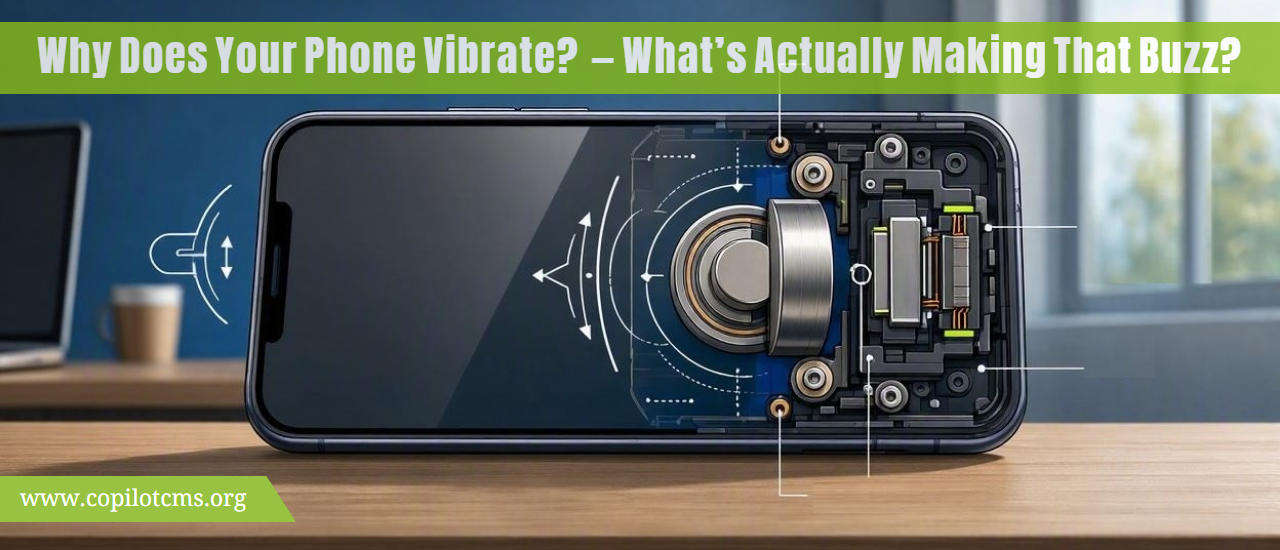
Your phone can buzz in your pocket, on a table, or even when it looks completely silent—but what is actually producing that vibration? The answer is a tiny mechanical system inside your phone that rapidly moves a small weight back and forth.
What Actually Makes a Phone Vibrate?
Despite how powerful the vibration feels, your phone does not have a tiny speaker or motor spinning the entire phone around. Instead, it contains a small component called a haptic actuator (often simply called a vibration motor).
This component converts electrical energy into physical movement. When your phone sends electricity to it, a tiny part inside moves very quickly. Because that movement happens repeatedly, it causes the phone itself to shake.
That shaking is what you feel as a vibration.
The Real-World Version: A Tiny Washing Machine
Imagine a washing machine during a spin cycle. If the clothes inside are unevenly distributed, the machine can wobble and shake because something inside is moving around rapidly.
Your phone uses a much smaller and much more controlled version of this idea.
Inside the phone, a tiny moving component creates a small amount of physical force. The phone's body transfers that force to your hand, pocket, or the surface underneath it.
Of course, the phone's vibration system is carefully designed rather than being an accidental imbalance. It is deliberately moving a tiny mass to produce a predictable sensation.
There Isn't Just One Kind of Vibration Motor
Phones have used several different technologies to create vibration. Two important types are ERM motors and linear resonant actuators.
ERM: The Spinning Weight
One traditional approach uses an ERM, or eccentric rotating mass, motor.
The basic idea is surprisingly simple. A tiny electric motor spins a small weight that is deliberately mounted off-center.
Think about holding a small electric toothbrush. If something inside the handle spins unevenly, the whole toothbrush shakes in your hand. An ERM vibration motor works using a similar principle.
As the off-center weight spins, it repeatedly pulls the phone in slightly different directions. The result is the familiar buzzing sensation.
Why Is the Weight Off-Center?
If the weight were perfectly balanced around the motor's spinning axis, the rotation would be much smoother and would produce far less vibration.
By placing the weight off-center, the motor creates a changing force as it rotates. That changing force is transferred to the phone.
In simple terms:
- Electricity reaches the motor.
- The motor begins spinning.
- An off-center weight rotates with it.
- The changing force makes the phone shake.
- Your hand feels the shaking as a buzz.
LRA: Moving Back and Forth
Many modern smartphones use a different approach called an LRA, or linear resonant actuator.
Instead of continuously spinning a weight, an LRA moves a small mass back and forth along a particular direction.
You can imagine a tiny piston rapidly moving forward and backward inside the phone.
This allows the phone to produce carefully controlled vibrations. It can create short taps, longer pulses, and different tactile sensations rather than simply producing one continuous buzz.
How Does Electricity Turn Into Movement?
The key idea is electromagnetism.
Electricity flowing through a wire can create a magnetic field. Magnetic fields can attract or repel other magnetic materials. Engineers use this relationship to create controlled movement inside the vibration actuator.
You do not need to understand the physics equations to understand the basic process:
Electrical energy → magnetic force → physical movement → vibration you can feel.
This same broad relationship between electricity and magnetism is used in many other technologies, including speakers, electric motors, and other actuators.
Why Does the Whole Phone Shake?
The vibration component itself is extremely small. So why can you feel the entire phone?
The answer is that the actuator is physically attached to the phone's internal structure.
When the actuator moves, it applies a force to the phone. The phone's frame and other components respond to that force. Because the phone is being held in your hand or resting against another surface, you can feel the resulting movement.
It is similar to tapping a table. Your finger moves only a small distance, but the table can transmit the resulting vibration through its surface.
How Does Your Phone Know When to Vibrate?
The vibration motor does not decide when to buzz by itself. The phone's software tells it when vibration is needed.
For example, when someone calls you, several parts of the phone's software work together:
- The phone receives information that an incoming call is arriving.
- The operating system checks your notification and sound settings.
- The system determines whether vibration should be used.
- It sends instructions to the hardware that controls the vibration actuator.
- The actuator moves in a specific pattern.
- You feel the resulting vibration.
The same basic process can happen when you receive a text message, notification, alarm, or other system event.
Your Phone Doesn't Always Vibrate in the Same Way
Modern phones can create different vibration patterns rather than simply switching the motor on and off.
For example, a notification might produce a short pulse, while an incoming call might produce repeated pulses for several seconds.
The operating system can control things such as:
- How long the actuator moves.
- How strong the vibration feels.
- When the vibration starts and stops.
- Whether multiple pulses are used.
- The timing between pulses.
This creates what is known as haptic feedback.
What Is Haptic Feedback?
Haptic feedback means using physical sensations—usually vibrations or movements—to communicate information to you.
Vibration is therefore not limited to notifications.
When you type on a phone's virtual keyboard, for example, the phone may give a tiny vibration when you press a key. When you change a setting, drag a control, or perform a particular gesture, the phone may provide another subtle tactile response.
The goal is to make something happening on a flat glass screen feel more physical.
Why Is This Useful?
A touchscreen has no physical buttons for your fingers to press. You can see the screen changing, but you cannot physically feel a button moving underneath your finger.
Haptic feedback helps fill that gap.
It is like adding a tiny confirmation tap to an otherwise silent action: "Yes, the phone noticed what you just did."
Why Does a Vibration Sometimes Feel Like a Click?
A well-designed haptic system can produce a very short, precise vibration that feels more like a physical click than a traditional buzz.
This happens because the phone can carefully control the actuator's movement and timing.
Instead of running the actuator continuously, the software can send a precisely timed pulse. Your nervous system interprets that sudden physical sensation as a small tap or click.
This is one reason modern smartphones can feel surprisingly responsive even though their screens are just smooth sheets of glass.
Why Does the Vibration Sound Different on a Table?
Put your phone on a soft bed and activate vibration. Then put the same phone on a hard wooden table.
You may notice that the sound is dramatically different.
The actuator is producing roughly the same type of physical movement, but the surface underneath the phone changes how that movement is transferred into sound.
A soft mattress absorbs much of the movement. A hard table can transmit the vibration and act almost like a small soundboard.
That is why a phone that feels relatively quiet in your hand can sound surprisingly loud when it is vibrating against a desk.
Why Does a Phone Sometimes Vibrate More Than Expected?
The perceived strength of vibration depends on more than the actuator itself.
Several factors can affect what you feel:
- Phone construction: The frame and internal structure influence how vibrations travel.
- Where you are holding it: Different parts of the phone can transmit vibration differently.
- Surface contact: A hard table can make vibration more noticeable.
- Software settings: Different vibration intensities and patterns may be available.
- Case design: A thick or soft case can change how vibration reaches your hand.
Why Does Your Phone Vibrate When You Type?
When haptic keyboard feedback is enabled, every key press can trigger a tiny vibration.
The process is very fast:
- You touch a key on the screen.
- The touchscreen detects the change in electrical properties caused by your finger.
- The operating system identifies which key you pressed.
- The keyboard software requests haptic feedback.
- The phone's haptic system activates the actuator for a very short period.
- You feel a tiny tap almost immediately.
The entire process happens quickly enough that the vibration feels directly connected to your touch.
Why Does the Phone Vibrate Without Making a Sound?
Sound and vibration are closely related, but they are not the same thing.
A phone can produce sound by moving a speaker's diaphragm, which pushes air and creates pressure waves that your ears detect.
A vibration actuator, on the other hand, primarily moves the phone itself.
So when your phone is in silent mode, it can use the vibration actuator to communicate with your body without deliberately producing audible notification sounds.
Does Vibration Use Battery Power?
Yes. The vibration actuator requires electrical energy to operate.
However, individual vibration events are generally short, so a single notification vibration uses only a small amount of energy.
If your phone vibrates constantly—for example, because of repeated notifications, keyboard feedback, or another application—the total energy consumption can become more noticeable.
Like almost everything inside a smartphone, vibration is a trade-off between useful functionality and energy consumption.
What If Your Phone Stops Vibrating?
If vibration suddenly stops working, the problem is not necessarily a broken motor. Software settings can also prevent vibration.
Check Your Vibration Settings
Look through your phone's sound, notification, accessibility, and haptic settings. Depending on the phone and operating system, different types of vibration may have separate controls.
Check Do Not Disturb or Similar Modes
Modes designed to reduce interruptions can change how notifications behave. Check whether a special mode is preventing certain alerts from vibrating.
Restart the Phone
A temporary software problem can sometimes affect hardware-related features. Restarting the phone gives the operating system a fresh start and can resolve certain glitches.
Test Different Types of Vibration
Try an incoming-call vibration, keyboard haptics, or another system vibration separately. If one works while another does not, the problem may be related to a particular setting or software feature rather than the physical actuator.
When Hardware Could Be the Problem
If vibration does not work anywhere even after checking settings and restarting the phone, a hardware problem is possible.
The actuator itself could be damaged, disconnected, or affected by physical damage. In that situation, professional repair may be necessary.
Can a Vibration Motor Wear Out?
Like other mechanical components, vibration actuators contain moving parts and can potentially wear out over a very long period.
However, modern phone vibration systems are designed for repeated use. A phone vibrating normally for notifications is not usually something you need to worry about damaging the actuator.
Physical damage, water exposure, manufacturing problems, or other internal failures are more obvious reasons for a vibration system to stop working properly.
Why Do Phones Use Vibration Instead of Just Sound?
Vibration solves several problems that sound cannot.
- It can be discreet: You can feel an alert without disturbing everyone nearby.
- It works in noisy places: You may feel a vibration even when you cannot hear a ringtone.
- It works when you are wearing headphones: A physical alert can still get your attention.
- It provides confirmation: Tiny haptic responses make touchscreen interactions feel more physical.
- It provides another communication channel: Your phone can communicate through sight, sound, and touch.
In other words, vibration gives your phone a way to "talk" to you through your sense of touch.
Why This Tiny Component Matters
A vibration actuator may be one of the least noticeable components inside a smartphone, but it plays an important role in the user experience.
Your phone's processor can perform billions of operations, its display can show millions of pixels, and its cameras can capture detailed images. But none of those things directly tell your hand that you successfully pressed a button.
Haptics provide that physical connection.
They turn an invisible software event into something your body can actually feel.
The Takeaway
When your phone vibrates, a tiny actuator inside it is converting electrical energy into controlled physical movement. Older-style ERM motors create vibration by spinning an off-center weight, while modern phones may use linear actuators that move a small mass back and forth with much greater precision.
Your phone's software decides when and how that actuator should move, allowing it to produce everything from a long notification buzz to an almost imperceptible tap when you touch the screen.
So the next time your phone gives you a little buzz, remember: there is a tiny mechanical system inside the device rapidly moving under precise electronic control—all to give your software a way to communicate with your sense of touch.