
How Does AI Generate an Image From a Sentence?
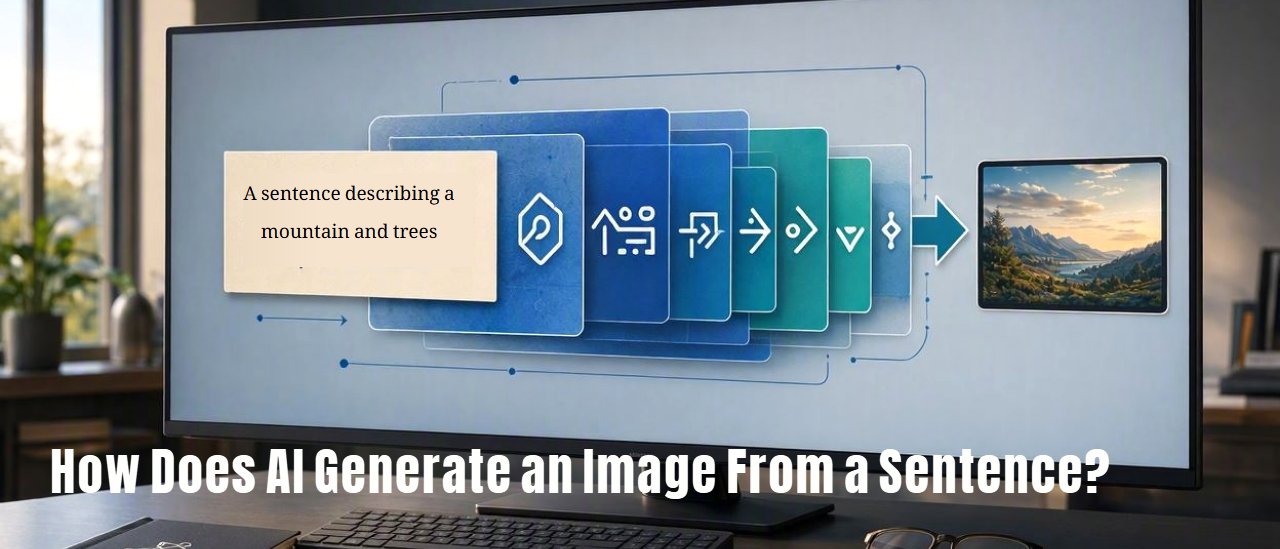
You type something like “a small wooden cabin beside a lake at sunset, surrounded by pine trees,” and a few seconds later, an AI produces an image that never existed before. But how can a computer turn ordinary words into something visual?
The answer involves language, mathematics, patterns learned from enormous collections of images, and a process that gradually turns something resembling visual noise into a recognizable picture.
The Basic Idea: Words Go In, Pixels Come Out
An AI image generator does not understand your sentence in quite the same way a human artist does. Instead, it converts your words into mathematical information that represents their meaning and relationships.
It then uses that information as a guide while constructing an image.
In simplified form, the process looks something like this:
- You write a prompt.
- The AI processes the words and their relationships.
- The text is converted into numerical information.
- The image-generation model begins with random visual information.
- The model repeatedly changes that information while following the meaning of your prompt.
- Eventually, the result becomes a recognizable image.
There is a lot happening inside those steps, but the overall idea is surprisingly understandable once we break it down.
First, What Is an AI Image Generator?
An AI image generator is a computer system trained to produce images from instructions. Depending on the system, the instruction might be a sentence, several paragraphs, an existing image, a sketch, or some combination of these.
Popular systems can generate things such as:
- Photorealistic scenes
- Illustrations
- Paintings
- Cartoon characters
- Product concepts
- Architectural ideas
- Fantasy environments
- Diagrams and visual concepts
What makes the technology remarkable is that the model usually isn't retrieving an existing picture that matches your sentence. It is generating a new image based on patterns it learned during training.
Real-World Version: Imagine a Student Who Has Studied Millions of Pictures
Imagine a student who has spent years looking at enormous numbers of pictures and learning how people describe them.
The student has encountered pictures of dogs, cats, houses, forests, cars, mountains, people, paintings, photographs, sunsets, and countless other things.
Over time, the student learns relationships such as:
- A dog usually has four legs, a head, ears, and a body.
- A sunset often involves a bright light source near the horizon.
- A forest contains trees arranged across a landscape.
- A wooden cabin tends to have walls, a roof, doors, and windows.
Now imagine telling the student:
“Draw a small wooden cabin beside a lake at sunset.”
The student does not need to find that exact picture in a filing cabinet. Instead, they can combine what they have learned about cabins, lakes, sunsets, trees, lighting, and composition.
AI image generation works somewhat like this, although the actual technology is mathematical rather than human-like imagination.
Step 1: The AI Reads Your Sentence
Suppose you enter this prompt:
“A red bicycle leaning against an old brick wall on a rainy evening.”
The computer cannot directly feed this sentence into the image-generation machinery as ordinary English. It first needs to convert the language into a form the model can work with mathematically.
Words Become Numbers
AI systems commonly use a component called a text encoder to transform text into numerical representations.
You can think of this as creating a mathematical description of what your sentence is talking about.
The system needs to capture relationships between concepts such as:
- “red” and “bicycle”
- “bicycle” and “leaning”
- “brick” and “wall”
- “rainy” and “evening”
The important point is that the AI is not simply looking up the dictionary definition of each word. It is working with numerical representations that can encode relationships and associations between concepts.
What Is an Embedding?
You may hear the word embedding when people explain modern AI.
An embedding is essentially a numerical representation of information, such as a word, phrase, image, or other concept, in a mathematical space.
Imagine a gigantic map where related ideas tend to appear closer together.
On such a conceptual map, ideas related to “cat” might be relatively close to “kitten,” while ideas related to “airplane” might be located somewhere else.
The actual mathematical spaces used by AI are far more complicated than a simple two-dimensional map. They can contain hundreds or thousands of numerical dimensions.
You can think of the embedding as the AI's way of turning language into a format that the rest of the system can use.
Step 2: The AI Connects Your Words With Visual Concepts
Now the system has a mathematical representation of your prompt. But it still needs to turn those words into visual information.
During training, the model learned associations between language and visual patterns.
For example, after processing huge amounts of training material, a model can learn that descriptions involving “snow-covered mountains” tend to correspond to certain visual patterns: mountain shapes, white surfaces, cold-colored environments, skies, shadows, and so on.
Likewise, “red bicycle” gives the model information about both the object and its color.
“Leaning against a wall” gives information about the relationship between objects.
“Rainy evening” gives information about atmosphere, lighting, reflections, and the appearance of the scene.
The model combines all these signals rather than treating each word as an isolated command.
Step 3: The Image May Start as Random Noise
Here is one of the most interesting parts.
In many modern image-generation systems, the generation process can begin with something that looks like visual static or random noise.
Imagine turning on an old television that has no channel selected. Instead of a meaningful picture, you see a field of random-looking dots.
Now imagine an incredibly sophisticated system that can repeatedly examine that noise and ask:
“How can I change this so that it becomes more consistent with the sentence I was given?”
That is roughly the idea behind diffusion-based image generation.
What Is Diffusion?
Diffusion is the name commonly used for a family of techniques behind many modern AI image generators.
The easiest way to understand it is to think about reversing a process.
Imagine Mixing Paint With Dust
Imagine you have a beautiful painting. Now imagine gradually covering it with more and more random visual noise until eventually you can no longer recognize the original painting.
During training, a diffusion model learns how to deal with this kind of transformation. It learns patterns that help it estimate what a cleaner image might look like when given a noisy version.
During generation, the process can work in the opposite direction: start with noise and repeatedly make it less noisy and more structured.
Each step moves the result closer to something that matches the requested concept.
Step 4: The AI Removes Noise Little by Little
Imagine looking at a photograph through a window covered in heavy fog.
At first, you can barely see anything. As the fog gradually clears, you might notice a large shape. Then you recognize a building. Then windows, doors, trees, shadows, and other details become clearer.
Image generation can work somewhat like this, except the AI is not literally removing physical fog.
It repeatedly transforms the mathematical representation of the image, gradually moving it toward a coherent result.
Early stages may establish broad features such as:
- Where the sky should be
- Where the ground should be
- Where major objects might appear
- Overall colors and lighting
- General shapes and composition
Later stages can refine smaller details.
Step 5: The Prompt Guides the Process
If the AI were simply turning random noise into an image without any instructions, you could get almost anything.
Your prompt provides direction.
Think of the generation process as a sculptor working with a block of material while constantly referring to a description of what the finished sculpture should represent.
If you ask for a “red bicycle,” the system is guided toward visual patterns associated with bicycles and the color red.
If you add “covered in raindrops,” the model receives additional information about the appearance of the bicycle and its environment.
If you add “cinematic photograph at night,” you are also giving information about lighting, atmosphere, and visual style.
Why Does the AI Understand Phrases Like “Behind” or “Beside”?
This is one of the difficult parts of image generation.
Generating individual objects is relatively straightforward compared with correctly understanding relationships between objects.
Consider these two prompts:
- “A cat beside a dog.”
- “A dog beside a cat.”
The objects are the same, but their relationships and emphasis can differ.
Modern models learn many kinds of relationships from their training data. They can associate language with spatial arrangements, visual attributes, actions, and broader scene concepts.
However, these systems are not perfect. They can still misunderstand complicated instructions, spatial relationships, quantities, or unusual combinations of concepts.
Why AI Sometimes Gets Hands, Text, or Small Details Wrong
You may have seen AI-generated images where the overall scene looks impressive but a small detail is strange.
Perhaps a person has an unusual number of fingers, a sign contains nonsense writing, or an object has an impossible shape.
Why does this happen?
One reason is that the model is generating visual patterns rather than following a precise engineering blueprint for every object.
If you ask a traditional graphics program to draw a rectangle with exactly four corners, it can follow an explicit geometric instruction.
An AI image model works differently. It has learned statistical patterns associated with images and language, and it generates a result that fits those patterns.
That can produce remarkably realistic results, but it can also produce details that are visually plausible at first glance yet incorrect when examined closely.
Why Text Inside Images Can Be Difficult
Text is a particularly interesting challenge.
Humans know that the letters in a word must appear in a specific order. If a sign says “COFFEE,” changing one letter can turn it into nonsense.
For an image-generation model, however, letters can initially be treated as visual shapes and patterns rather than as perfectly structured characters in a word-processing document.
As image-generation technology has improved, some systems have become much better at producing readable text, but errors can still occur, especially with long passages, unusual fonts, tiny writing, or complex layouts.
Does the AI Copy Pictures From the Internet?
This is an important question because the answer is more complicated than simply saying “yes” or “no.”
AI image models are trained using large datasets containing images and associated information. The exact composition of a training dataset depends on the model, its developers, licensing arrangements, and other factors.
The model learns statistical relationships and visual patterns during training. When generating a new image, it generally does not operate like a search engine that simply finds one stored photograph and pastes it into your result.
However, questions about training data, copyright, consent, attribution, and whether particular works were appropriately included in training datasets are important and sometimes legally contested.
Training an Image Generator
Before an image generator can create pictures from prompts, it needs to be trained.
Training is the stage where the model learns patterns from large amounts of data.
Imagine Teaching Someone to Recognize Objects
Suppose you show a student thousands of pictures and descriptions.
You show them a picture of a bicycle and associate it with the word “bicycle.” You show them photographs of mountains and associate them with descriptions of mountains. You repeat this process across enormous numbers of examples.
The student gradually becomes better at recognizing relationships between words and visual features.
An AI model does something conceptually similar, although its learning process is based on mathematical optimization rather than human memory.
What Does the Model Actually Learn?
The model does not simply memorize a giant catalog of finished pictures.
Instead, training adjusts enormous numbers of internal parameters so that the system becomes better at predicting and reconstructing patterns.
These parameters are sometimes compared to adjustable knobs. During training, the system repeatedly makes predictions, measures how far those predictions are from the desired result, and adjusts the parameters.
After enormous numbers of these adjustments, the model can become capable of generating complex visual patterns.
What Are Parameters?
A parameter is a numerical value inside a machine-learning model that is adjusted during training.
For a simple analogy, imagine a huge mixing console with millions or billions of tiny controls. Each control influences the behavior of the system in some way.
Training is like repeatedly adjusting those controls until the overall system becomes good at the task.
Modern AI models can contain enormous numbers of parameters, although the number alone does not tell you exactly how capable a model is.
Latent Space: The Hidden Workspace
You may also encounter another term: latent space.
This sounds mysterious, but the basic idea is simply that the model can represent information in an internal mathematical space that is not directly visible to us.
Instead of representing every image as a giant list of individual pixels from the beginning, many systems work with compressed mathematical representations of visual information.
Think of it like a blueprint.
A photograph might contain millions of individual pixels. A blueprint does not need to describe every speck of paint individually. It can describe the important structure of the building in a much more compact form.
Working in a compressed representation can make image generation more efficient.
Pixels vs. Meaning
A digital image is ultimately made from pixels, but thinking directly in terms of millions of pixels is not always the most efficient way for an AI system to reason about a scene.
Consider a photograph of a red apple on a table.
At the pixel level, it is simply a huge collection of numerical color values.
At a higher level, however, we can describe it as:
- An apple
- The color red
- A table
- A particular spatial relationship between them
- Lighting
- Shadows
- A background
AI systems use internal representations that allow them to work with these kinds of patterns rather than treating every pixel as an entirely independent piece of information.
Why Can the Same Prompt Produce Different Images?
Try generating an image with the exact same prompt several times and you may receive different results.
That is often intentional.
Generation can involve randomness, particularly in the initial noise or other parts of the sampling process.
Think of rolling dice while following the same set of instructions. The general activity is the same, but the exact outcome can vary.
One generation might place the subject slightly to the left, while another might use a different composition, lighting arrangement, or background.
What Is a Seed?
Many image-generation systems use the term seed for the value that helps determine the initial random state of a generation process.
You can think of the seed as the starting roll of the dice.
If a system allows you to reuse the same seed together with the same or similar settings and prompt, you may be able to reproduce or closely reproduce a result.
Different systems handle seeds differently, so the exact behavior depends on the tool.
Why Does Changing One Word Change the Whole Image?
Imagine ordering a pizza and changing the instruction from “cheese pizza” to “pepperoni pizza.” The basic object remains a pizza, but one ingredient changes the appearance of the whole dish.
Similarly, changing one word in an image prompt can alter the relationships among many visual elements.
Compare:
- “A house in winter”
- “A house in summer”
The second prompt does not merely replace snow with green grass. It can affect lighting, vegetation, clothing, sky conditions, colors, and the overall atmosphere.
The model is generating a coherent scene, so changing one important concept can cause many other parts of the image to change as well.
How Does the AI Know What “Photorealistic” Means?
Words such as “photorealistic,” “watercolor,” “oil painting,” “cartoon,” or “cinematic” can influence the appearance of an image because the model has encountered visual patterns associated with these descriptions during training.
For example, “watercolor” may guide the system toward patterns involving soft edges, pigment-like textures, paper backgrounds, and characteristic color blending.
“Photorealistic” can guide it toward photographic lighting, realistic textures, natural depth, and other visual characteristics.
In other words, style words act as additional instructions that influence the mathematical direction of the generation process.
Why Prompt Writing Matters
A prompt is more than a list of objects. It can describe the subject, environment, composition, lighting, style, mood, and other characteristics.
For example, compare:
Simple: “A dog in a park.”
More detailed: “A golden retriever sitting on a grassy park path, surrounded by tall trees, early morning sunlight, natural photographic style, shallow depth of field.”
The second prompt gives the model considerably more information about what you want.
However, more words do not automatically mean better results. A long prompt containing contradictory instructions can make the result less predictable.
A Useful Way to Think About a Prompt
You can imagine a prompt as answering several simple questions:
- What? What is the main subject?
- Where? What environment is it in?
- Doing what? What action or position is involved?
- When? What time of day or historical period?
- How does it look? What style or visual appearance?
- How is it lit? Bright sunlight, candlelight, studio lighting, moonlight, and so on.
- How is it framed? Close-up, wide shot, overhead view, portrait, landscape, etc.
This gives you a practical framework for describing what you want without needing to learn a complicated “secret prompt language.”
What Happens When You Ask for a Specific Composition?
Suppose you request:
“A lighthouse on the left side of the image, with the ocean extending toward the horizon on the right.”
Now you are not merely describing objects. You are describing their spatial relationships.
Modern image models can often respond to such instructions, but spatial precision is still one of the areas where AI-generated images can behave unpredictably.
If exact positioning is essential, tools that support image editing, masking, sketches, layout guidance, or other forms of control may be more appropriate than relying entirely on text.
Does the AI Actually “See” the Final Image?
Not in the human sense.
The model processes numerical representations of visual information. It does not have eyes or human visual experience.
When we say that an AI “understands” an image, we should remember that this is shorthand for a sophisticated mathematical system that has learned useful relationships between visual patterns and other information.
This distinction matters because AI can be extremely good at some visual tasks while still making surprisingly strange mistakes.
Why Does AI Sometimes Create Impossible Objects?
Imagine describing a bicycle to someone who has seen thousands of bicycles but has never actually ridden one or physically examined how its parts connect.
They might produce a convincing-looking bicycle, but perhaps the chain connects incorrectly or a wheel is attached in an impossible way.
AI image generators can have similar problems.
They are extremely good at producing patterns that look plausible, but visual plausibility is not always the same thing as physical correctness.
This is why generated images can contain:
- Impossible object structures
- Incorrect reflections
- Strange shadows
- Inconsistent perspective
- Odd anatomy
- Unreadable or distorted text
- Objects that merge into one another
Why Does AI Image Generation Take Time?
Generating an image requires a substantial amount of computation.
The system may perform many mathematical operations during the generation process, repeatedly transforming the representation of the image.
This is why specialized graphics hardware is valuable for AI.
A modern GPU can perform enormous numbers of mathematical operations in parallel, making it well suited to many machine-learning workloads.
Cloud-based AI image generators can perform this work on powerful servers instead of your own computer. Your device may simply send the prompt to a remote system and receive the finished image.
Is the Image Generated on Your Computer?
It depends on the software.
Some AI image tools run the generation on remote servers. Others can run models locally on a sufficiently powerful computer.
When generation happens in the cloud, the process may look like this:
- Your device sends the prompt to a server.
- The server processes the text.
- The AI model generates the image.
- The server sends the resulting image back to your device.
Your browser may therefore be showing you the result of a huge amount of computation that happened somewhere else.
Why This Matters
Understanding how AI image generation works helps explain both its impressive abilities and its limitations.
It explains why an AI can create a completely new-looking scene from a short sentence, but also why the result may contain an incorrect sign, an impossible object, or a subtle visual mistake.
It also helps you understand why prompt wording matters. You are not giving instructions to a human illustrator who consciously plans every brushstroke. You are providing language that guides a trained mathematical model toward a particular region of possible visual outcomes.
Practical Tips for Getting Better Results
If you are experimenting with an AI image generator, you can often improve results by describing the important parts of the image clearly.
Start With the Main Subject
Say what you actually want to see first.
For example: “A red vintage bicycle…”
Add the Environment
Explain where the subject is.
For example: “…leaning against an old brick wall on a quiet European street…”
Add Lighting or Time
Lighting can strongly affect the appearance of an image.
For example: “…during a rainy blue-hour evening, with soft street lights reflecting on the wet pavement…”
Specify the Visual Style When Necessary
If you want a particular appearance, describe it.
For example: “…photorealistic street photography with natural lighting.”
Do Not Overload the Prompt With Contradictions
Instructions such as “dark night with bright midday sunlight” can create conflicting signals unless the unusual combination is intentional.
Clear instructions usually give the model a more coherent target.
What If the First Image Isn't Right?
Don't assume that the technology has failed just because the first result isn't what you imagined.
Image generation is often an iterative process.
Think of it like working with an artist who produces a first sketch. You might say, “Move the bicycle farther into the background,” or “Make the scene brighter,” and then create another version.
Depending on the tool, you may be able to:
- Rewrite the prompt
- Generate another variation
- Change the composition
- Edit a particular area
- Provide a reference image
- Change the visual style
- Adjust image dimensions
- Use a different generation model or setting
The Big Picture: From Sentence to Image
Let's put everything together.
- You write a sentence. For example, “A small cabin beside a lake at sunset.”
- The text is processed. A text encoder converts the words into mathematical representations.
- The model connects language with visual concepts. It uses patterns learned during training.
- A generation process begins. In diffusion-style systems, this can involve a noisy starting representation.
- The noise is progressively transformed. The model repeatedly guides the representation toward the requested concepts.
- Visual details emerge. Shapes, colors, lighting, objects, and relationships become increasingly defined.
- The final image is produced. The internal representation is converted into an image that your device can display.
All of this can happen in seconds because modern hardware is capable of performing enormous amounts of computation very quickly.
Is This Really “Creating” an Image?
This question goes beyond the mechanics of the technology.
Technically, an AI image generator produces a new digital output by applying patterns learned during training according to a user's instructions and the model's generation process.
Whether that should be described as “creating,” “generating,” “synthesizing,” or something else is partly a question of language and philosophy. The important technical point is that the system is not simply opening a folder and selecting a photograph that already exists.
The Takeaway
An AI image generator turns language into mathematics, uses patterns learned during training to connect those mathematical instructions with visual concepts, and then generates an image through a computational process that can gradually transform noise or another starting representation into a coherent picture.
The simplest way to picture it is this: your sentence gives the AI a destination, and the model uses what it has learned about images to find a visual path toward that destination.
It can be remarkably creative-looking, but it is not a human artist hiding inside your computer. It is a sophisticated pattern-generating system—and understanding that distinction makes both its abilities and its mistakes much easier to understand.