
How Does a Relational Database Work?
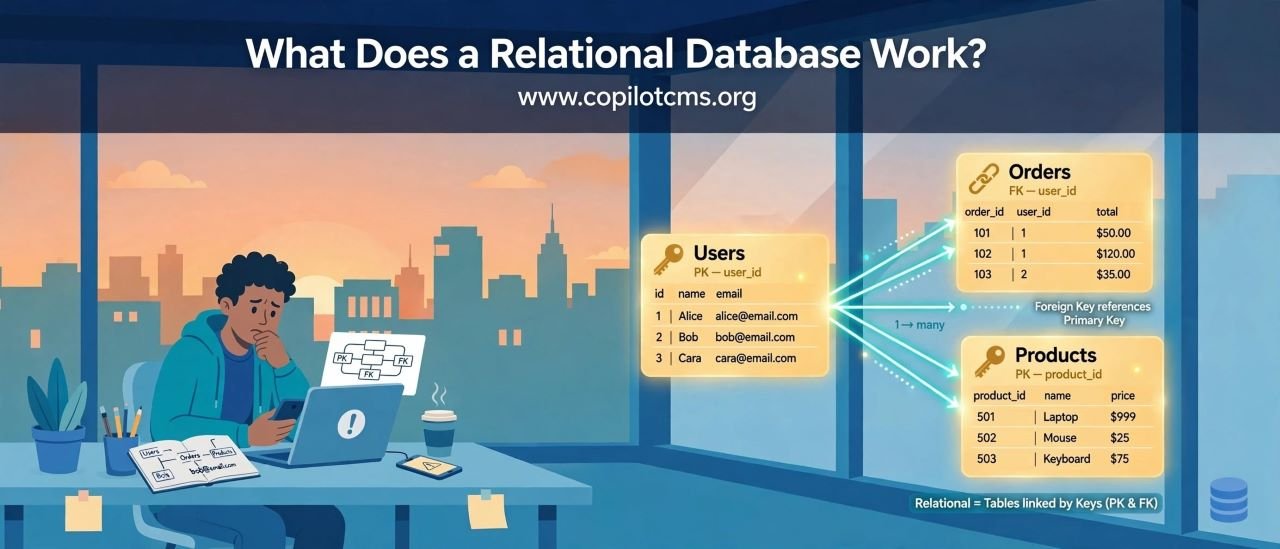
Every time you log in to a website, place an order, search for a product, or check your account balance, there is often a database quietly working behind the scenes. A relational database is essentially an organized system for storing information, finding it quickly, changing it safely, and keeping it available when something goes wrong.
What Is a Database?
Before understanding a relational database, it helps to understand what a database is in the first place.
A database is a structured collection of information that a computer can store, organize, search, update, and retrieve.
Imagine a large library. The library does not simply throw thousands of books into one giant room and expect the librarian to find anything instantly. Books are organized into sections, given labels, and recorded in a catalog.
A database does something similar with digital information. Instead of books, it might store customers, products, orders, messages, payments, employees, or thousands of other types of information.
So, What Makes a Database "Relational"?
A relational database stores information in tables. Each table contains rows and columns, much like a spreadsheet.
But there is an important difference: relational databases can connect different tables together using relationships.
For example, an online store might have separate tables for:
- Customers
- Products
- Orders
- Payments
- Addresses
Instead of putting every piece of information into one enormous table, the database can keep related information in separate places and connect it when necessary.
The Real-World Version: A Filing System
Imagine a company's office containing several filing cabinets.
One cabinet contains customer records. Another contains product information. Another contains orders. Each customer has an identification number, and an order records which customer placed it.
If someone asks, "What did customer number 1042 order?" the office does not need to duplicate the customer's entire personal record inside every order. It can look up customer 1042 and then find the orders associated with that customer.
A relational database works in much the same way, except the filing cabinets are digital and the searching can happen in fractions of a second.
Tables: The Building Blocks
A relational database organizes information into tables.
Suppose we have a simple Customers table:
- Customer ID
- Name
- Phone
Each horizontal record is called a row, while each category of information is represented by a column.
One row might represent one customer:
- Customer ID: 1042
- Name: Ahmed
- Email: ahmed@example.com
- Phone: 0300-1234567
The important idea is that the database understands what each piece of information represents. It is not simply a pile of text.
Rows and Columns
Columns Describe the Information
A column defines what kind of information belongs in that particular position.
For example, an Email column is intended to contain email addresses, while a Customer ID column identifies customers.
Rows Represent Individual Records
A row normally represents one complete record.
If a table contains 50,000 customers, it may contain approximately 50,000 customer rows.
This structure makes information much easier for software to understand and work with.
What Is a Primary Key?
One of the most important ideas in a relational database is the primary key.
A primary key is a value that uniquely identifies a particular row in a table.
Think of it like an identification number on an official document. Two people might have the same first name, but their identification numbers are different.
Similarly, two customers could both be named Ahmed, but their customer IDs might be:
- Customer 1042 — Ahmed
- Customer 1875 — Ahmed
The database can therefore tell exactly which Ahmed is which.
Why Not Just Use the Person's Name?
Names are not necessarily unique. The same problem occurs with other information.
Two customers could potentially share an email address in badly designed systems, or an email address could change. A carefully designed database therefore uses a stable identifier for each record.
A primary key gives the database a reliable way to say, "I mean this exact record."
Relationships Between Tables
This is where the "relational" part becomes especially useful.
Suppose an online store has these two tables:
Customers
- Customer ID
- Name
Orders
- Order ID
- Customer ID
- Order Date
- Total
The Customer ID in the Orders table can point to the customer who placed the order.
This creates a relationship between the two tables.
Primary Keys and Foreign Keys
A foreign key is a column used to refer to a record in another table.
For example, Customer ID might be the primary key in the Customers table. The same Customer ID can appear in the Orders table as a foreign key.
Think of it like a reference written on a form:
"This order belongs to customer number 1042."
The database can then connect the order to the correct customer without copying all of the customer's information into the order record.
Why Split Information Into Multiple Tables?
At first, putting everything into one giant table might seem easier. But it creates problems as the amount of information grows.
Imagine an online store that stores the customer's name, email, phone number, and address inside every single order.
If the same customer places 100 orders, the database might store the same information 100 times.
That wastes storage and creates another problem: what happens when the customer's phone number changes?
You might have to update dozens or hundreds of records.
By separating customers and orders into related tables, the database can store the customer's information once and connect it to many orders.
CRUD: The Four Basic Things Databases Do
A large amount of database activity can be described using four basic operations known as CRUD:
- Create — add new information
- Read — retrieve existing information
- Update — change existing information
- Delete — remove information
These four operations form the foundation of many applications.
Create: Adding New Information
Suppose you create an account on a website.
The website may need to create a new customer record containing your name, email address, and other information.
That is a Create operation.
Similarly, placing an order may create a new order record.
Read: Finding Information
When you log into a website and see your profile, the application is reading information from the database.
When an online shop displays your previous orders, it is also reading information.
Searching for a particular product is another example of reading data.
Update: Changing Information
Suppose you change your phone number in your account settings.
The website does not necessarily create an entirely new customer. Instead, it can update the existing record.
That is an Update operation.
Delete: Removing Information
When you delete a saved address, remove a comment, or delete a record from an administrative system, the application may perform a Delete operation.
Deletion sounds simple, but real systems often need to be careful about it. Removing one record could affect other records that depend on it.
How Does a Website Actually Talk to a Database?
Usually, a person does not directly open the database and type commands into it.
Instead, an application sits between the user and the database.
For example:
- You open an online store.
- Your browser sends a request to the website's server.
- The server's application determines what information is needed.
- The application asks the database for that information.
- The database finds the requested records.
- The database sends the results back to the application.
- The application sends a response to your browser.
You see a product page, but behind that page there may have been several database operations.
SQL: The Language Commonly Used With Relational Databases
Relational databases are commonly accessed using SQL, which stands for Structured Query Language.
You can think of SQL as a language for giving instructions to the database.
For example, an application might effectively ask:
- Give me this customer's information.
- Find all products that cost less than a certain amount.
- Add this new order.
- Change this customer's email address.
- Remove this particular record.
The database management system interprets these instructions and performs the required work.
What Is a Database Management System?
The database itself is the stored information, but the software responsible for managing that information is called a Database Management System, or DBMS.
Examples of relational database systems include MySQL, PostgreSQL, Microsoft SQL Server, Oracle Database, and SQLite.
The DBMS is like the librarian in our earlier analogy. It manages the shelves, understands requests, finds information, controls access, and helps protect the collection.
How Does a Database Search So Much Information So Quickly?
Imagine asking a librarian to find a book in a library containing millions of books.
If the librarian had to inspect every book one at a time, finding anything could take a very long time.
Databases solve this problem using structures called indexes.
What Is a Database Index?
An index is an additional structure that helps the database find particular information more efficiently.
A simple real-world example is the index at the back of a textbook.
If you want to learn about "photosynthesis," you do not need to read every page from beginning to end. You can look in the index, find the relevant page number, and go there directly.
A database index works on a similar principle.
Without an Index
If a database needs to find a particular value and has no useful index, it may have to examine a large number of rows to locate the matching records.
With an Index
An appropriate index can give the database a much faster route to the relevant records.
This can become extremely important when a table contains hundreds of thousands or millions of rows.
Indexes Are Not Free
Indexes make searching faster, but they also require storage and maintenance.
When information changes, the database may also need to update the relevant indexes.
It is therefore not always a good idea to put an index on every column.
A good database designer chooses indexes based on how the application actually searches and uses the data.
How Much Information Can a Database Store?
One of the useful things about databases is that they can handle far more information than a typical spreadsheet or manually maintained file.
The exact storage capability depends on the particular database system, hardware, operating system, configuration, data types, and application design.
A small database might contain only a few hundred records. A large production system can contain millions, billions, or more records distributed across storage systems.
But "how much can it store?" is not just a question of the maximum theoretical number of rows. Performance, available disk space, memory, indexing, hardware, database design, and workload all matter.
Where Is the Database Actually Stored?
Database information ultimately has to live somewhere physically.
That usually means storage devices such as SSDs or hard drives in computers or servers.
You may interact with a website from your phone, but the database could be stored on powerful servers inside a data center somewhere else in the world.
The database software manages files on that storage and organizes them so that information can be retrieved and changed efficiently.
What Happens When You Search for Something?
Suppose you search an online store for a product called "wireless keyboard."
A simplified version of what happens is:
- Your browser sends the search request to the website.
- The website's application interprets your request.
- The application sends an appropriate database query.
- The database examines the relevant data and indexes.
- The database finds matching products.
- The results are returned to the application.
- The application formats the results for your browser.
What looks like a simple search box can therefore trigger a chain of operations involving several different pieces of software.
What Happens When Many People Use the Database at Once?
A real database may have thousands or millions of users interacting with it simultaneously.
One person might be creating an account while another is placing an order, another is searching for products, and another is checking their payment history.
The database management system has to coordinate these operations so that users do not accidentally interfere with one another.
Transactions: Keeping Operations Consistent
Databases use a concept called a transaction to handle groups of related operations safely.
Imagine transferring money between two bank accounts.
The system needs to subtract money from one account and add it to another. It would be a serious problem if the first operation succeeded but the second one failed, leaving the system in an inconsistent state.
A transaction allows related operations to be treated as one logical unit.
In simplified terms, the idea is:
Either the required group of changes succeeds properly, or the system can roll back the incomplete operation.
Why Data Integrity Matters
A database is not useful if it contains unreliable or contradictory information.
For example, an order might refer to a customer who does not exist, or a product might somehow have a negative stock quantity when the application does not allow that.
Relational database systems provide rules and constraints that help prevent invalid data from entering the system.
Constraints: Rules for the Data
Database designers can define rules for what is allowed.
For example:
- A primary key must uniquely identify a record.
- A required field should not be left empty.
- A value may need to follow a particular data type.
- A foreign key may be required to refer to an existing record.
- A particular value may need to be unique.
These rules act like quality-control checks for the information being stored.
What Happens If the Computer Suddenly Loses Power?
This is one of the most important questions about databases.
Imagine someone is updating thousands of records when the server suddenly loses power.
A database cannot simply assume that everything will always finish perfectly.
Database systems therefore use techniques such as transaction logging and recovery mechanisms to help preserve consistency and recover from interruptions.
Database Logs: A Record of Important Changes
Many database systems maintain logs that record information about changes being made.
A useful analogy is a notebook used by an accountant.
Instead of simply changing the final numbers and forgetting what happened, the accountant keeps a record of important transactions.
If something goes wrong, those records can help the database determine what had already happened and what needs to be recovered.
What About Backups?
Recovery mechanisms are not the same thing as backups.
A backup is a separate copy of important data that can be used if the original data is lost, corrupted, accidentally deleted, or otherwise unavailable.
Think of your database as an important collection of documents. A backup is like keeping a second copy somewhere safe.
Why Backups Matter
Many different things can cause data loss:
- Hardware failure
- Software bugs
- Accidental deletion
- Human mistakes
- Storage corruption
- Security incidents
- Natural disasters
A database that works perfectly today can still be vulnerable if there is no reliable recovery plan.
A Backup Is Only Useful If It Can Be Restored
Simply saying "we have backups" is not enough.
Organizations should also test whether those backups can actually be restored.
Imagine keeping a spare key in a safe place but never checking whether the key still opens the door. Discovering that it does not work during an emergency would be too late.
Database administrators therefore need to think about both backup and recovery.
What Happens If a Database Server Fails?
Large systems are often designed so that one hardware failure does not necessarily bring the entire service down.
Organizations may use multiple servers, replicated copies of data, redundant storage, monitoring systems, and automated recovery mechanisms.
The exact architecture varies greatly depending on how important the application is and how much downtime the organization can tolerate.
Replication: Keeping More Than One Copy
Replication means maintaining copies of database information on more than one system.
Imagine a library making duplicate copies of an important collection and storing them in different buildings.
If one building becomes unavailable, another copy may still be accessible.
Replication can improve availability and provide additional protection, although it is not a replacement for proper backups.
What If Someone Deletes the Wrong Data?
This is an excellent example of why backups and recovery procedures matter.
A database may faithfully execute a perfectly valid delete command even when a human entered it by mistake.
The database cannot always know that a person made a mistake.
That is why responsible database systems combine technical protections, access controls, backups, logging, and carefully designed procedures.
Who Is Allowed to Change the Database?
Databases can contain extremely sensitive information, so access needs to be controlled.
A database system can have different users or applications with different permissions.
For example, one account might be allowed to read customer information but not delete it. Another might be allowed to manage database structure.
This follows the general principle of giving each user or application only the permissions it actually needs.
Why Can't We Just Use a Spreadsheet?
Spreadsheets are useful tools and can work extremely well for small amounts of information.
But databases are designed for situations where information needs to be shared, searched, updated, protected, and processed reliably by applications and many users.
Imagine keeping a company's entire customer and order system in one spreadsheet file. As the organization grows, multiple people may need to edit it simultaneously, relationships between records become complicated, searches become more demanding, and protecting the information becomes increasingly important.
A database is built specifically for these kinds of workloads.
Normalization: Avoiding Unnecessary Repetition
Relational database design often involves a concept called normalization.
The basic idea is to organize information so that unnecessary duplication is reduced and relationships between pieces of data are represented cleanly.
Returning to our online store example, customer information does not need to be repeated inside every order. The Orders table can refer to the appropriate customer through a customer ID.
Normalization can make data easier to maintain, although real-world database design sometimes involves deliberate duplication for performance or other practical reasons.
What Is a Query?
A query is essentially a request for information or an operation on the database.
You can think of it as asking the database a carefully structured question:
- "Find this customer."
- "Show me all orders from this month."
- "Find products in this category."
- "Add this new record."
- "Change this customer's address."
The database processes the request and returns the appropriate result or performs the requested operation.
The Database Doesn't Necessarily Read Everything
One reason databases can handle enormous amounts of information is that they have sophisticated ways of deciding how to execute queries.
When a query arrives, the database can consider available indexes, the structure of the data, filtering conditions, and other factors.
The database can then choose an execution strategy intended to retrieve the required information efficiently.
What Is a Query Optimizer?
Many relational database systems include a query optimizer.
Think of it like a GPS deciding which route to take.
If you ask how to get from one location to another, there may be several possible routes. The GPS evaluates them and chooses an appropriate route based on factors such as distance and traffic.
A database optimizer performs a similar job with database queries. It evaluates possible ways of retrieving the requested information and selects an execution plan.
Why Can a Database Become Slow?
Even a well-designed database can become slow under certain conditions.
Common causes include:
- Very large amounts of data
- Poorly designed queries
- Missing or inappropriate indexes
- Too many simultaneous requests
- Insufficient memory or processing power
- Slow storage
- Database design problems
- Applications making unnecessary requests
This is why database performance is not simply a matter of buying a faster computer. The way information is organized and accessed matters too.
Why This Matters to Everyday Technology
You probably interact with databases dozens or hundreds of times without realizing it.
When you:
- Log into an account
- Send a message
- Buy something online
- Check an order
- Search for a product
- Book a ticket
- Read a social media feed
- Check your bank transactions
there is a good chance that some kind of database is involved behind the scenes.
The screen you see is only the visible part. The database may be storing and retrieving the information that makes the application useful.
A Simple End-to-End Example
Let's put everything together using an online shopping example.
Step 1: You Create an Account
The website collects your information and creates a customer record.
This is a Create operation, and the new record receives a unique primary key such as a Customer ID.
Step 2: You Search for a Product
The application sends a query to the database asking for products matching your search.
An appropriate index may help the database find the relevant products efficiently.
Step 3: You Place an Order
The database creates an order record and connects it to your customer record using your Customer ID.
Step 4: You View Your Orders
The application asks the database to find orders associated with your Customer ID.
The database retrieves the relevant records and sends them back to the application.
Step 5: You Change Your Address
The application updates your customer or address record.
This is an Update operation.
Step 6: Something Goes Wrong
If a server fails, recovery mechanisms, replicated data, and backups may help the organization restore service and recover information.
All of these operations happen behind the scenes while the user simply sees a website.
Common Database Problems and What They Mean
"The Website Is Very Slow"
The problem could be anywhere in the application, but database-related causes can include inefficient queries, missing indexes, overloaded servers, or very large amounts of data.
"The Search Takes Forever"
The database may be examining too much information, or the search may not be taking advantage of a suitable index. Poor query design can also be responsible.
"Data Suddenly Disappeared"
Possible causes include accidental deletion, software errors, synchronization problems, or storage failures. This is where database logs, backups, and recovery procedures become extremely important.
"Two Records Have the Same ID"
A properly configured primary key should prevent duplicate values in the same table. If such a problem appears, it may indicate a database design, application, or integrity issue.
Relational Databases vs. Other Kinds of Databases
Relational databases are not the only way to store information.
There are also databases designed around other models, including document databases, key-value stores, graph databases, and others.
Different database models are useful for different kinds of applications and workloads.
Relational databases remain particularly useful when information has clear relationships and the application needs strong structure, reliable transactions, and powerful querying capabilities.
The Big Picture
A relational database is much more than a digital spreadsheet.
It is a system for organizing related information into structured tables, identifying individual records, connecting records across tables, searching large amounts of data, safely changing information, controlling access, and recovering from failures.
The basic pieces fit together like this:
- Tables organize information.
- Rows represent records.
- Columns describe pieces of information.
- Primary keys uniquely identify records.
- Foreign keys connect related records.
- CRUD describes creating, reading, updating, and deleting information.
- Indexes help searches run efficiently.
- Transactions help groups of changes happen safely.
- Constraints help maintain valid data.
- Logs and recovery mechanisms help deal with interruptions and failures.
- Backups provide additional protection against data loss.
- Permissions control who or what can access the information.
The Takeaway
A relational database is essentially a highly organized digital filing system that computers can search, update, connect, protect, and recover at enormous scale. Whenever an application needs to remember information and reliably use it later, a database is often doing the quiet work behind the scenes.
Once you understand tables, keys, relationships, CRUD, queries, indexes, transactions, and backups, much of the mysterious activity happening behind websites and applications starts to make sense.