
SQL vs. NoSQL Databases
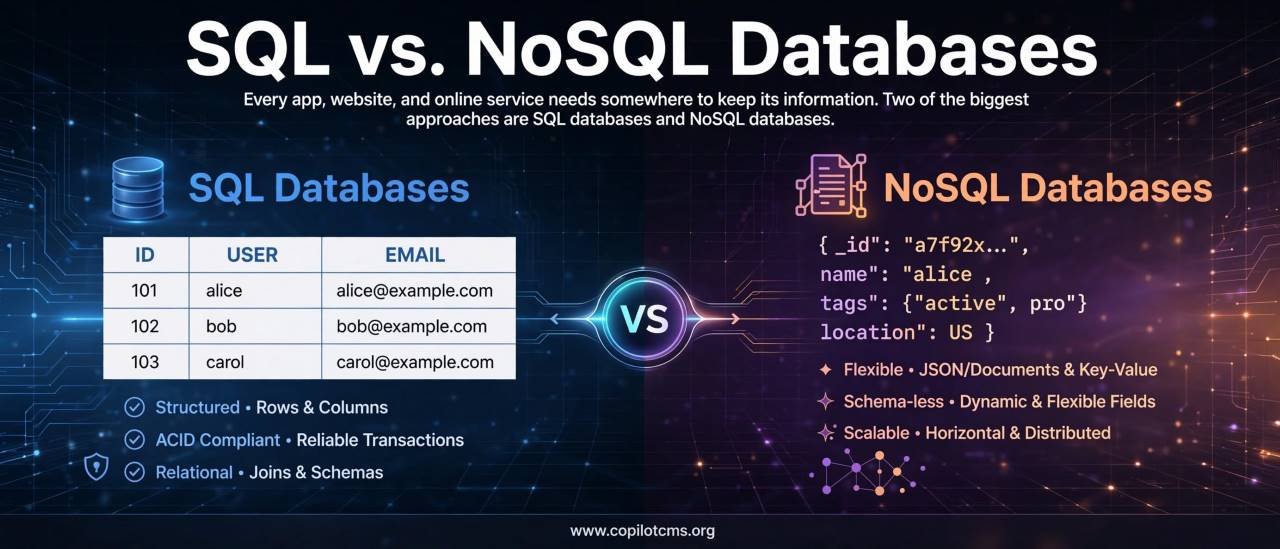
Every app, website, and online service needs somewhere to keep its information. Two of the biggest approaches are SQL databases and NoSQL databases—and despite the complicated names, the basic idea is surprisingly easy to understand.
What Is a Database?
Before comparing SQL and NoSQL, let's start with the basic question: what exactly is a database?
A database is an organized place where computer programs store information so they can find, change, and manage it later.
Imagine a large library. The books are the information, while the library's catalog helps you find the particular book you need. A database does something similar, except it can store enormous amounts of digital information and search through it extremely quickly.
For example, an online shopping website might have information about:
- Customers
- Products
- Prices
- Orders
- Payments
- Product reviews
- Shipping addresses
Instead of keeping all this information in random files, the website stores it in a database that its software can work with.
So What Are SQL and NoSQL?
SQL and NoSQL are two broad approaches to working with databases.
SQL stands for Structured Query Language. SQL databases generally organize information into structured tables made up of rows and columns.
NoSQL originally meant "Not Only SQL." NoSQL databases generally use data models other than the traditional relational table model. Depending on the database, information might be stored as documents, key-value pairs, graphs, or wide-column records.
The important thing to understand is that SQL and NoSQL are not simply two different programming languages. They describe different approaches to organizing and working with data.
The Real-World Version: Filing Cabinets vs. Flexible Boxes
Imagine that you run a large office and need to organize customer information.
With a traditional filing system, you might create carefully labeled filing cabinets. Every customer form follows the same structure: name, address, phone number, email, and customer ID.
That is similar to the structured approach used by a relational SQL database.
Now imagine another office where every customer gets a flexible box. One box might contain a name, phone number, and address. Another might contain a name, several addresses, social-media information, and preferences. The boxes can have different contents depending on the customer.
That is closer to the flexibility offered by many NoSQL databases.
Neither approach is automatically better. The right choice depends on the kind of information you have and what your application needs to do with it.
How SQL Databases Organize Information
SQL databases are commonly called relational databases because they can represent relationships between different sets of information.
Imagine a database for an online shop.
You might have a Customers table:
- Customer ID
- Name
You could have a separate Orders table:
- Order ID
- Customer ID
- Order Date
- Total
The Customer ID connects an order to the customer who placed it.
This is one of the most important ideas behind relational databases: information can be separated into related tables rather than repeatedly stored in the same place.
Rows and Columns
A table looks a lot like a spreadsheet.
For example:
- Each row represents one record.
- Each column represents a particular piece of information.
A Customers table might conceptually look like this:
ID | Name | Email
101 | Ahmed | ahmed@example.com
102 | Sara | sara@example.com
The database can then use SQL commands to find, add, modify, or remove records.
What Is SQL?
SQL is a language used to communicate with relational databases.
Instead of telling the database manually which rows to inspect, you can give it a query describing what you want.
For example, a simplified SQL query might look like:
SELECT name
FROM customers
WHERE id = 101;
In plain English, this is essentially saying: "Find the name of the customer whose ID is 101."
SQL can also be used to insert new information, update existing information, delete information, create tables, and perform complicated searches involving multiple tables.
Popular SQL Databases
Several well-known database systems use the relational SQL model, including:
- MySQL
- PostgreSQL
- Microsoft SQL Server
- Oracle Database
- SQLite
- MariaDB
They differ in features and implementation, but they share the fundamental relational approach.
What Makes SQL Databases Useful?
One major strength of SQL databases is their ability to handle structured data and relationships very effectively.
Suppose an online store has millions of customers and orders. You might want to ask:
- Which orders belong to a particular customer?
- Which products were included in those orders?
- Which customers bought a particular product?
- How much did customers in a particular city spend?
Relational databases are designed to perform this kind of connected-data work.
What Does "Relational" Mean?
The word relational can sound intimidating, but the concept is simple.
Suppose you have a Customers table and an Orders table. The customer's ID can be used to connect the two.
Think of it like two lists in an office:
The first list says:
Customer 101 = Ahmed
The second says:
Order 5001 = Customer 101
Because both lists contain the same identifier, the database knows that Order 5001 belongs to Ahmed.
These connections between tables are called relationships.
What Is a NoSQL Database?
NoSQL databases take a different approach to organizing information.
Rather than requiring everything to fit into traditional rows and columns, NoSQL databases can use different structures depending on the type of database.
One particularly common approach is the document database.
A document database might store a customer as a document that looks conceptually like this:
{
  "name": "Ahmed",
  "email": "ahmed@example.com",
  "city": "Lahore",
  "interests": ["technology", "photography"]
}
This resembles a digital form or a small package containing related information.
Another customer could have additional information without necessarily requiring the entire database structure to be redesigned.
The Main Types of NoSQL Databases
"NoSQL" is actually a broad category. Not every NoSQL database works in exactly the same way.
Document Databases
Document databases store information as documents, commonly using JSON-like structures.
They are useful when an application naturally works with objects or documents that contain related information.
Examples include MongoDB and Couchbase.
Key-Value Databases
A key-value database is similar to a giant dictionary.
You have a key and a corresponding value.
For example:
"user_101" → "Ahmed"
"theme_101" → "dark"
This approach can be extremely useful when an application frequently needs to retrieve information when it already knows the key.
Redis is a well-known example of a key-value-oriented data store, although it supports additional data structures as well.
Wide-Column Databases
Wide-column databases organize data around columns and column families rather than using the traditional relational-table approach.
They are designed for certain large-scale workloads where data may be distributed across many machines.
Examples include Apache Cassandra and Google Cloud Bigtable.
Graph Databases
Graph databases focus on relationships between things.
Imagine a social network. One person follows another person. That person works at a company. The company has employees. Those employees know other people.
A graph database represents these entities and their connections directly.
Neo4j is a well-known graph database.
SQL vs. NoSQL: The Basic Difference
The simplest way to think about the difference is this:
SQL databases generally emphasize structured tables, defined relationships, and a common query language.
NoSQL databases generally provide alternative data models that can offer more flexibility in how information is organized.
But there is an important warning: the real world is more complicated than the slogan "SQL = structured, NoSQL = unstructured."
NoSQL databases can still have structure, and SQL databases can handle many kinds of data. Modern database systems also increasingly borrow ideas from one another.
Schema: The Database's Blueprint
One of the most important differences involves something called a schema.
A schema is essentially a description of how data is organized.
Think of building a house.
Before construction begins, an architect may create a blueprint specifying where the rooms, doors, windows, and plumbing will go.
A traditional SQL database commonly uses a defined schema. A table might specify that every customer has an ID, name, and email, with particular data types and rules.
Many NoSQL databases offer a more flexible schema, allowing different documents to contain different fields.
Why Flexible Data Can Be Useful
Imagine that you are building a rapidly changing application.
Today, a user profile contains:
- Name
Later, you decide to add:
- Profile picture
- Location
- Interests
A document-oriented NoSQL design may make this kind of evolving data model convenient.
However, flexibility does not mean "no rules." The application still needs to know what information it expects and how that information should be interpreted.
SQL and NoSQL Handle Relationships Differently
This is another important difference.
SQL databases are specifically designed around relationships between tables. They can use operations known as joins to bring related information together.
NoSQL databases often encourage designs where frequently used related information is stored together, although the exact approach depends on the database.
Think about a restaurant menu.
A relational approach might keep the restaurant, menu items, prices, and categories in separate but connected lists.
A document-oriented approach might keep much of a restaurant's menu information together inside one document.
Which design makes more sense depends on how the application reads and changes the data.
Transactions: Keeping Related Changes Together
Imagine transferring $100 from one bank account to another.
Two things need to happen:
- $100 must be removed from the first account.
- $100 must be added to the second account.
What happens if the computer crashes after removing the money but before adding it to the second account?
That would be a serious problem.
Database transactions are designed to help ensure that related operations happen safely as a unit.
Traditional relational databases have long been strongly associated with ACID transactions, a set of properties designed to help maintain reliable data changes.
Modern NoSQL databases can also support transactions, sometimes across multiple records or documents. Therefore, it is no longer accurate to say simply that "SQL has transactions and NoSQL does not."
What Does ACID Mean?
ACID is an acronym for four properties:
- Atomicity: A transaction is treated as a whole. It should not leave a half-completed operation behind.
- Consistency: A successful transaction should leave the database following its defined rules.
- Isolation: Concurrent transactions should not improperly interfere with one another.
- Durability: Once a transaction has been successfully committed, its changes should survive failures.
The details can become quite technical, but the everyday idea is simple: important changes should happen reliably rather than leaving the database in a broken halfway state.
Scaling: What Happens When the Database Gets Huge?
Another frequently discussed difference involves scaling.
Imagine your small shop becomes a worldwide company.
Your database might eventually need to handle millions or billions of records and huge numbers of requests.
One way of scaling is to give a single powerful machine more resources. This is often called vertical scaling.
Another approach is to spread the work across multiple machines. This is commonly called horizontal scaling.
Many NoSQL systems were designed with distributed, horizontally scalable workloads in mind. Some relational databases can also scale horizontally, and modern SQL systems can be distributed as well.
So again, the difference is not an absolute rule. It is better to think about the design goals of a particular database system.
Performance: Which One Is Faster?
This is one of the most common questions, but there is no universal answer.
Asking "Is SQL faster than NoSQL?" is a little like asking "Is a car faster than a truck?"
It depends on what you are trying to do.
A particular NoSQL database might be extremely efficient for retrieving a document by its key. A relational database might be highly efficient for a complicated query involving multiple related tables.
Performance depends on factors such as:
- The database system being used
- The size and shape of the data
- The queries being performed
- Indexes
- Hardware
- Network conditions
- Database design
- Number of simultaneous users
- How the application accesses the database
A poorly designed database can be slow regardless of whether it is SQL or NoSQL.
Indexes: The Database's Table of Contents
Databases can use indexes to find information more efficiently.
Imagine searching for a person's name in a 1,000-page book.
If you have no index, you might have to inspect page after page.
With an alphabetical index, you can jump much closer to the information you need.
A database index serves a similar purpose. It can help the database locate records without examining every piece of data.
Indexes can dramatically improve some searches, but they also consume storage and can make certain data changes more expensive. Good database design involves choosing useful indexes rather than indexing everything.
SQL vs. NoSQL: A Simple Comparison
| Feature | SQL Databases | NoSQL Databases |
|---|---|---|
| Typical model | Relational tables | Documents, key-value, wide-column, graph, and other models |
| Schema | Usually more predefined | Often more flexible |
| Relationships | Strong support for relationships between tables | Approach varies by database and data model |
| Querying | SQL | Database-specific APIs or query languages, depending on the system |
| Transactions | Strong transactional support is a traditional strength | Many modern systems also support transactions, with capabilities varying by product |
| Data structure | Generally organized into related tables | Depends on the NoSQL model |
| Scaling | Can scale vertically and, in some systems, horizontally | Many systems are designed for distributed horizontal scaling |
| Typical strength | Structured, relational, transaction-heavy workloads | Flexible or highly distributed workloads, depending on the database |
When Does SQL Make Sense?
A relational SQL database can be a natural choice when your data has clear relationships and consistency is particularly important.
Examples might include:
- Banking systems
- Accounting applications
- Order management
- Inventory systems
- Business applications
- Customer relationship systems
- Applications with complex relationships between records
For example, an accounting system might contain invoices, customers, payments, accounts, and transactions that need to remain carefully connected.
When Does NoSQL Make Sense?
NoSQL can be useful when an application needs a particular non-relational data model, flexible records, or a distributed architecture suited to its workload.
Examples can include:
- Large-scale content platforms
- Real-time applications
- Systems handling rapidly changing document structures
- High-volume event or telemetry data
- Caching and fast key-based lookups
- Applications where graph relationships are the central problem
But remember that these are examples, not strict rules. A large application can use SQL, NoSQL, or several database technologies at the same time.
Can an Application Use Both?
Absolutely.
Modern applications do not have to choose one database technology for everything.
Imagine a large online store. It could use a relational database for orders and payments, a search engine for product searches, and a key-value database for fast temporary data such as sessions or cached results.
This is sometimes called polyglot persistence: using different storage technologies for different jobs.
The important question is not "Which database is the winner?" but rather:
"What kind of data do I have, and what does my application need to do with it?"
Common Misunderstandings About SQL and NoSQL
"NoSQL Means There Is No Structure"
Not necessarily.
NoSQL databases still have structures and rules. They simply may not require every record to fit into the same traditional table-and-column structure.
"NoSQL Is Always Faster"
No.
Performance depends on the workload, database design, queries, indexes, hardware, and many other factors.
"SQL Is Old and NoSQL Is New"
SQL databases have been around for decades, while NoSQL databases became especially prominent with the growth of large-scale web applications and distributed computing.
But "older" does not mean "obsolete." Relational databases remain extremely important and continue to evolve.
"NoSQL Replaced SQL"
It didn't.
Both approaches continue to be widely used because they solve different kinds of problems.
What Should a Beginner Learn First?
If you are new to databases, learning basic SQL is an excellent starting point.
SQL teaches several fundamental ideas:
- How data is organized
- How tables work
- How records are identified
- How relationships work
- How to search for information
- How to insert and update data
- How databases enforce rules
Once you understand these concepts, NoSQL databases become easier to understand because you can compare their different approaches with something familiar.
Practical Example: Building a Blog
Imagine you are building a blog with thousands of articles and users.
A relational design might have separate tables for:
- Users
- Articles
- Categories
- Comments
- Tags
These tables could be connected through IDs.
A document database might instead store an article as a document containing its title, author information, tags, and other related information, depending on how the application is designed.
Neither design is automatically correct. The better design depends on questions such as:
- How will articles be searched?
- How often will information change?
- How many users will access the system?
- How closely related are the pieces of information?
- What kinds of queries will the application need?
Why This Matters for Everyday Technology
You may never directly see a database while using an application, but databases are working behind the scenes in countless services.
When you log into a website, place an online order, search for a product, post a comment, or check your account balance, some form of data storage is usually involved.
The database is essentially the application's memory.
The user interface is what you see. The application code is what performs the work. The database is where much of the information needed to perform that work is stored.
Troubleshooting: Why Can Database Problems Be Difficult?
When an application becomes slow or starts behaving strangely, the database can sometimes be part of the problem.
The Query Is Slow
A database query may be searching through a huge amount of information without an appropriate index.
Think of it like: trying to find one name in a huge filing cabinet with no labels.
The Database Is Using Too Many Resources
Large queries, inefficient operations, or too many simultaneous requests can consume CPU, memory, storage, or network resources.
The Data Structure Does Not Match the Application
A database can technically store the information while still being poorly designed for the way the application uses it.
Think of it like: having a perfectly organized warehouse where every item is stored in a location that is extremely inconvenient to reach.
Too Much Data Is Being Repeated
Duplicating information can sometimes make certain NoSQL workloads convenient, but it can also create a maintenance problem if the same information changes in multiple places.
The Application and Database Are Far Apart
Even a fast database can feel slow if the application constantly sends information across a slow network connection.
This is why database performance is not just about choosing SQL or NoSQL. The entire system matters.
The Bigger Picture: Database Design Matters More Than the Label
One of the most useful lessons for a beginner is that SQL versus NoSQL is not a simple competition between two technologies.
It is a question of matching a data model to a problem.
If your application revolves around strongly connected records, complex queries, and carefully controlled transactions, a relational model may fit naturally.
If your application needs a document-oriented model, highly flexible records, graph relationships, or a particular distributed workload, a NoSQL system may be appropriate.
And sometimes the answer is to use both.
The Takeaway
SQL databases organize information primarily into structured, related tables and are especially well suited to applications with clear relationships and transactional requirements. NoSQL databases use a variety of alternative models—including documents, key-value pairs, wide columns, and graphs—and can provide flexibility or specialized capabilities for particular workloads.
The easiest way to remember the difference is to imagine organizing a library. SQL is like a carefully designed catalog system where books, authors, categories, and borrowers are organized into connected records. NoSQL is more like choosing different kinds of storage systems depending on what you are trying to keep and how you need to retrieve it.
Neither approach is universally better. Good database engineering starts by understanding the data, the relationships, the queries, the workload, and the application's requirements—and then choosing the technology that fits those needs.